 IG
IG FOREX.com
 CMC Markets
 XTB
XTB eToro
eToro AvaTrade
 Pepperstone
 FP Markets
 Tickmill
HFM (HF Markets) Review

Written by Steven Hatzakis
Director of Online Broker Research

Edited by Jeff Anberg
Senior Editor

Fact-checked by Blain Reinkensmeyer
Managing Partner
Steven HatzakisDirector of Online Broker Research
Steven Hatzakis is the Global Director of Online Broker Research for ForexBrokers.com. He is a forex industry expert and an active fintech and crypto researcher.


CFDs are complex instruments and come with a high risk of losing money rapidly due to leverage. 71.37% of retail investor accounts lose money when trading CFDs with this provider. You should consider whether you understand how CFDs work and whether you can afford to take the high risk of losing your money.
There is a version of HFM (HF Markets) that I would recommend, and a version I would not, and the distinction matters before you open an account. The version I would point traders to is the multi-entity, multi-regulator MetaTrader broker, where I placed trades on MT4 and MT5, ran a strategy through the MT5 Strategy Tester, and explored the broker's proprietary copy trading service. The version I would not recommend is the offshore InfinityX account with its unlimited leverage marketing.
On the CFD trading side, HFM offers 344 tradeable symbols, FX Blue-powered Premium Trader plugins for MetaTrader, an integrated copy trading platform inside the mobile app, and an in-house news and analyst stack sitting alongside FxStreet headlines. EUR/USD averaged 1.8 pips on the Pro account during testing, which is above the cheapest brokers we review but in line with the typical MetaTrader-only broker.
HFM is best suited for CFD traders who want MetaTrader at the center of their setup, with a copy trading service bundled in alongside it. Aggressive scalpers, algo arbitrageurs, and cost-sensitive traders should look elsewhere first.
-
Minimum Deposit:
$0 -
Trust Score:
85 -
Tradeable Symbols (Total):
344
| Range of Investments | |
| Trading Fees | |
| Trading Platforms | |
| Research | |
| Mobile Trading | |
| Education |
Check out ForexBrokers.com's picks for the best forex brokers in 2026.
| 2026 | #27 |
| 2025 | #30 |
| 2024 | #28 |
| 2023 | #29 |
| 2022 | #26 |
| 2020 | #22 |
 Why you can trust us
Led by Steven Hatzakis, Global Director of Online Broker Research, the ForexBrokers.com research team collects and audits data across more than 100 variables. We analyze key tools and features important to forex and CFD traders and collect data on commissions, spreads, and fees across the industry to help you find the best broker for your needs.
We also review each broker’s regulatory status; this research helps us determine whether you should trust the broker to keep your money safe. As part of this effort, we track 100+ international regulatory agencies to power our proprietary Trust Score rating system.
Our researchers open personal brokerage accounts and test all available platforms on desktop, web, and mobile for each broker reviewed on ForexBrokers.com. Learn more about how we test.
Can I open an account with this broker?
Use our country selector tool to view available brokers in your country.
Table of Contents
HFM pros and cons
Pros
- MetaTrader 4 and MT5 enhanced by the FX Blue Premium Trader plugin suite.
- Copy trading platform integrated into the HFM mobile app.
- Quality FxStreet news feed and weekly Live Market View briefings.
Cons
- Limited 344-symbol product offering.
- No proprietary desktop or web platform.
- Business terms restrict scalping, arbitrage, and AI-assisted strategies.
My top takeaways for HFM in 2026:
- 344 total tradeable symbols on MT5 from HFM's SVG entity, including 38 forex pairs and 10 crypto CFDs (crypto CFDs are not available to U.K. retail clients).
- Average EUR/USD spread of 1.8 pips on the Pro account against a $100 minimum deposit; the commission-based Zero account is the lower total cost route for active MT4/MT5 traders.
- MetaTrader 4 and MetaTrader 5 across desktop, web, and mobile, paired with the FX Blue-powered Premium Trader plugin suite.
- Copy trading platform built into the HFM mobile app, with filtering by Max Drawdown, Performance Fee, Risk Score, and Gain.
Trust Score
Developed by ForexBrokers.com and in use for nearly 10 years, Trust Score is a proprietary rating system powered by a range of unique quantitative and qualitative metrics, including each company’s number of regulatory licenses. Trust Scores range from 1 to 99 (the higher a broker’s rating, the better). Learn more.
Is HFM safe?

HFM is considered Trusted, with an overall Trust Score of 85 out of 99. HFM is not publicly traded and does not operate a bank, but is authorised by two Tier-1 regulators (Highly Trusted), three Tier-2 regulators (Trusted), zero Tier-3 regulator (Average Risk), and two Tier-4 regulators (High Risk). HFM is authorised by the following Tier-1 regulators: Financial Conduct Authority (FCA) and regulated in the European Union via the MiFID passporting system.
| Feature |
 HFM HFM
|
|---|---|
| Year Founded | 2010 |
| Publicly Traded (Listed) | No |
| Bank | No |
| Tier-1 Licenses | 2 |
| Tier-2 Licenses | 3 |
| Tier-3 Licenses | 0 |
| Tier-4 Licenses | 2 |
Range of investments
HFM's product offering sits below many multi-asset competitors. I counted 344 total tradeable symbols on the broker's MT5 platform from its SVG entity, which is HFM's broadest jurisdictional offering. The bulk of that count is composed of 157 single-stock CFDs, 38 forex pairs, 12 indices, 12 ETFs, 10 crypto CFDs, 6 metals, 2 energies, and a handful of bond CFDs. For traders coming from a multi-asset broker with thousands of products on a single login, the step down is real. For traders whose strategies live mostly in the major forex pairs, gold, and the most-traded indices, HFM covers what they need.
Cryptocurrency: HFM offers 10 popular crypto CFDs across its main Cent, Zero, Pro, and Premium accounts, while the offshore InfinityX account is restricted to Bitcoin, Ethereum, and XRP. Crypto CFDs are not available to retail traders from any broker's U.K. entity, nor to U.K. residents except where they qualify as Professional clients.
Stocks and ETFs: I found 157 single-stock CFDs on the MT5 platform, falling to 88 on MT4. The selection skews toward widely held U.S. names alongside large-cap U.K. and EU listings, with 12 ETFs to complement the equity book. Physical share dealing is not offered, and the broker does not list options, futures, spread betting, or thematic indices.
Leverage: Leverage caps follow the local regulator in each of HFM's onshore jurisdictions. The exception is the offshore InfinityX account, which advertises unlimited leverage against a zero-margin requirement. A position taken at extreme leverage can lose the full account balance during a single adverse move. I would only recommend this account to professionals managing risk on a portfolio level.
Available investment products
During our audit, we verified access to 38 forex pairs and 344 total tradeable symbols on MT5 out of HFM's SVG entity, alongside CFDs spanning indices, commodities, equities, ETFs, and a small list of bonds.
| Feature |
HFM
|
|---|---|
| Tradeable Symbols (Total) | 344 |
| Forex Pairs (Total) | 38 |
| Forex trading (Spot) | No |
| Forex trading (CFDs) | Yes |
| Forex trading (Options) | No |
| Forex trading (Futures) | No |
| Forex trading (Crypto) | No |
| Commodities: Agriculturals | Yes |
| Commodities: Oil | Yes |
| Commodities: Gold | Yes |
| Commodities: Silver | Yes |
| U.S. Stocks (Shares) | No |
| U.S. Stocks (CFDs) | Yes |
| U.S. Stocks (Crypto) | No |
| Global Stocks (Non-U.S. Shares) | No |
| Global Stocks (Non-U.S. CFDs) | No |
| 24/5 Trading (U.S. Stocks - Shares) | No |
| 24/5 Trading (U.S. Stocks - CFDs) | No |
| 24/7 Trading (Crypto) | No |
| Prediction markets | No |
| Copy Trading | Yes |
| Bitcoin (BTC) | Yes |
| Ethereum (ETH) | Yes |
| Cryptocurrencies (Total) | 10 |
| Cryptocurrency (Underlying) | No |
| Cryptocurrency (CFDs) | Yes |
| Cryptocurrency (Futures) | No |
| Disclaimers | Note: Crypto CFDs are not available to retail traders from any broker's U.K. entity, nor to U.K. residents (except to Professional clients). |
Available funding options
Our tests confirm support for bank wire transfers, debit and credit cards, crypto deposits, Skrill, and Neteller across the broker's main entities. PayPal, Apple Pay, and Google Pay are currently unavailable.
| Feature |
HFM
|
|---|---|
| Debit card (Deposit/withdraw) | Yes |
| Credit card (Deposit/withdraw) | Yes |
| Bank Wire (Deposit/Withdraw) | Yes |
| Non-wire bank transfer | No |
| Apple Pay (Deposit/Withdraw) | No |
| Google Pay (Deposit/Withdraw) | No |
| Crypto (Deposit/withdraw) | Yes |
| Cryptocurrency (Wallet transfers) | No |
| PayPal (Deposit/Withdraw) | No |
| Skrill (Deposit/Withdraw) | Yes |
| Neteller (Deposit/Withdraw) | Yes |
HFM fees
HFM's pricing sits in the middle of the field. On the Pro account, which is the broker's standard fixed-spread offering, I measured an average EUR/USD spread of 1.8 pips against a $100 minimum deposit. That number is above the spreads on the cheapest commission-free brokers on our slate, although it is broadly in line with the typical MetaTrader broker not running a raw-spread model on its standard account. The Premium account drops the minimum deposit to $0 but trades that off with materially wider spreads, while the Cent account is designed for traders sizing in micro-lots while they get their bearings.
For active traders, the Zero account is the option I would point to. It pairs raw-style spreads with a per-trade commission, which is a structurally lower total cost of trading than the Pro account once volume picks up. The offshore InfinityX account requires a $500 deposit, runs a 20% margin call threshold against a 0% stop-out level, and advertises unlimited leverage. The risk profile of that account is materially different from the other four. Positions taken at extreme leverage will hit the stop-out faster, and a violent move can wipe out the balance before the broker has time to issue a margin call.
Non-trading fees: HFM applies an inactivity fee on dormant accounts, with the schedule depending on the entity holding the account. The broker does not charge for international wire transfers, which is a point in its favor compared with peers that recoup wire fees at withdrawal time.
Overnight financing: Like every CFD broker on our slate, HFM applies overnight financing on positions held past the daily rollover, with the rate varying by instrument and direction. There is no guaranteed stop-loss order (GSLO) product, which means traders cannot pay a premium to cap overnight gap risk.
Trading fees
In our live pricing analysis, we observed an average EUR/USD spread of 1.8 pips on the Pro account; the Zero account inverts the structure with raw-style spreads and a per-trade commission.
| Feature |
HFM
|
|---|---|
| Average spread (EUR/USD) - Standard account | 1.8 |
| Average spread (EUR/USD) - Active trader account | N/A |
| Commission per trade (EUR/USD) - Standard account | N/A |
| Commission per trade (EUR/USD) - Active trader account | N/A |
| Inactivity Fee | Yes |
| International Wire Fee | 0 |
| Minimum Deposit | $0 |
Account types
We confirmed the availability of Cent, Zero, Pro, Premium, and the offshore InfinityX accounts during our evaluation, alongside a swap-free (Islamic) option. HFM does not offer a dedicated VIP or active trader tier.
| Feature |
HFM
|
|---|---|
| Variable Spreads | Yes |
| Fixed Spreads | No |
| Active Trader Program | Yes |
| VIP/Premium Account | No |
| Professional Account | Yes |
| Islamic Account | Yes |
Mobile trading apps
When testing the HFM mobile app, I placed trades on AUD/JPY, explored the copy trading offering, and benchmarked the charting tools against the apps available from competitors. The design is modern enough to feel current, with a five-button bottom navigation and country flags rendered against forex symbols, but the surface-level polish is not matched by what sits underneath. Placing a trade can be done in two taps with Quick Trading enabled, and the broker's MT4 and MT5 mobile apps are also available from the developer for traders who prefer a more familiar forex trading app.
Charting: The mobile charts ship with just 5 technical indicators and 11 drawing tools across 9 timeframes. That is enough to draw a trend line, place a Fibonacci retracement, and toggle between four sub-hour intervals before the higher-period charts, but it falls well short of the best apps in the category, which often carry close to 100 indicators and around 20 timeframes. Drag-to-modify trading from the chart is not supported, and there is no cross-device sync because HFM has no proprietary web counterpart for the mobile experience. Trendlines do save on a given chart, which is a small but welcome touch.
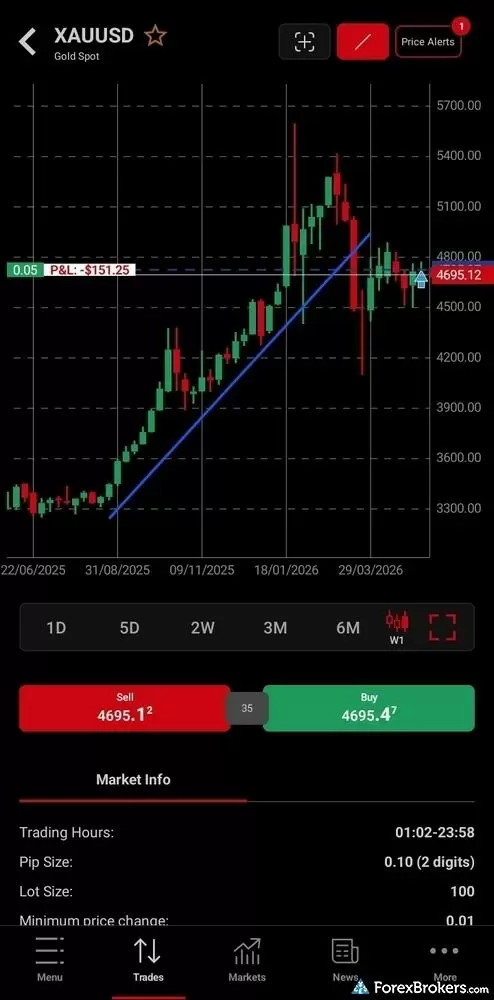
The HFM Android mobile application integrates technical analysis charting directly with order execution capabilities. The interface displays a candlestick chart for spot gold (XAU/USD), complete with drawing tools for plotting key trend lines. An active floating trade is clearly visualized with its real-time profit and loss tracking, positioned directly above prominent Sell and Buy execution buttons.
Order management: The default trade ticket lets you toggle between Units, Amount, and Lots. Stop-loss and take-profit toggles are present, but advanced order types are not. There are no trailing stops on the proprietary app, no guaranteed stop-loss orders, and no risk-reward visuals showing the ratio of value at risk to potential reward. I also ran into a bug while setting the stop-loss value with plenty of free margin available. The Loss Amount field appeared to be in an error state, and I had better luck setting the level by price in the Rate tab.
Discovery and copy trading: Watchlists outside the Favorites list are fixed, with no ability to build a custom list or pull up Top Gainers and Losers. There are no screeners and no AI-powered tools inside the app. The bright spot is copy trading, which sits inside the hamburger menu and lets you filter strategies by Max Drawdown, Performance Fee, Risk Score, Gain, and Account Type. Strategy detail pages took 3 to 5 seconds to load during testing, which I would expect to improve.
Available mobile platforms and tools
In our hands-on testing, we found 5 built-in charting indicators alongside 11 drawing tools and an integrated copy trading section, though the app lacks risk/reward visuals, chart-based drag-to-modify, and screeners.
| Feature |
HFM
|
|---|---|
| Proprietary Mobile Trading App | Yes |
| Android App | Yes |
| Apple iOS App | Yes |
| Mobile Price Alerts | Yes |
| Mobile Charting - Draw Trendlines | Yes |
| Mobile Charting - Trendlines Autosave | Yes |
| Mobile Charting - Indicators / Studies | 5 |
| Mobile Charting - Indicators Autosave | No |
| Mobile Watchlists - Column Filtering | Yes |
| Mobile Watchlists - Column Customization | Yes |
| Mobile Watchlists - Create & Manage | Yes |
| Mobile Watchlists - Syncing | No |
Trading platforms
HFM's trading platform offering centers on MetaTrader 4 and MetaTrader 5 across desktop, web, and mobile, with the broker's own HFM mobile app sitting alongside as a proprietary alternative for traders who want a lighter mobile experience. There is no proprietary web platform; the broker's website-advertised web app refers to its mobile experience rather than a separate browser-based platform. TradingView, cTrader, and integrated DOM-style depth-of-market are not part of the lineup. HFM does, however, organize the entire account management experience inside its client portal, including funding, demo and live account switching, and access to the copy trading web app.
Charting and execution: I worked primarily in MT5 during testing. The platform ships with 38 indicators and 19 drawing tools, with the ability to write custom indicators in MQL5 against the source code. Drag-to-modify a stop-loss or take-profit is supported, but you have to right-click into the chart and enable Trade Levels first. Once enabled, the experience is smoother than what the HFM mobile app offers, although still a step behind TradingView for the same task. One-click trading is supported once activated, the tick chart inside the trade ticket gives a real-time read on conditions as you place an order, and the Tile feature for arranging multiple chart windows is a nice quality-of-life touch on a multi-monitor setup.
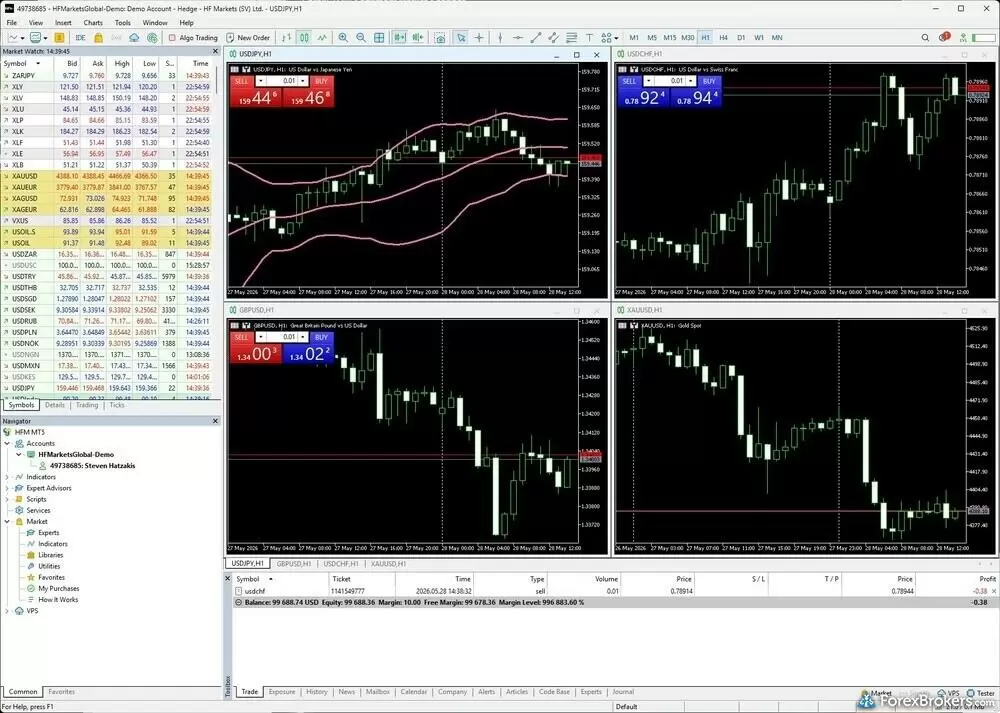
The HFM MetaTrader 5 (MT5) desktop platform delivers a highly customizable workspace tailored for advanced technical analysis and multi-asset monitoring. The interface seamlessly displays four active charts, including USD/JPY, USD/CHF, GBP/USD, and XAU/USD, allowing for efficient cross-market tracking.
Strategy testing and algo trading: The Strategy Tester in MT5 remains one of the strongest reasons traders pick MetaTrader. I have run extensive optimizations against the tester in the past, including one that took hundreds of hours to complete on a frequent-entry intraday strategy. MT5's cloud testing feature lets you offload that compute and shut your local machine off. Algo trading via Expert Advisors is natively supported on MT4 and MT5, but HFM's business terms prohibit arbitrage strategies, picking and sniping, and explicitly bar the use of artificial intelligence to analyze the platform. That last clause is broader than the language at most peers, which makes HFM a poor fit for active strategy traders.
Steven's take
"HFM explicitly prohibits traders from using artificial intelligence to analyze the trading platform, which is very broad. A trader using a Claude Chrome plugin with the platform open could be inadvertently flagged as violating the terms, even with no malicious intent."
Steven Hatzakis
Director of Online Broker Research
Plug-ins and signals: The broker offers a Premium Trader plugin suite from FX Blue Labs. Free access requires a $100 minimum deposit and at least one trade per month that stays open for longer than three minutes. The three-minute floor is HFM's guardrail against dormant accounts and ultra-short scalping flows that would otherwise qualify on a technicality. The bundle adds deal tickets, order templates, a central trading panel, and account-summary widgets to MT4 and MT5. Autochartist and HFM's Advanced Insights tooling are also delivered as MetaTrader plugins on the desktop. The MT5 Signals Market is disabled by HFM in favor of its own copy trading platform, which is reached from the client portal using your MT5 credentials.
Available trading platforms and features
Our platform walkthrough verified 38 charting indicators on MT5, alongside one-click trading and the FX Blue-powered Premium Trader plugin suite, though it excludes TradingView and cTrader.
| Feature |
HFM
|
|---|---|
| Desktop Platform (Windows) | Yes |
| Desktop Platform (Mac) | Yes |
| MetaTrader 4 (MT4) | Yes |
| MetaTrader 5 (MT5) | Yes |
| FX Blue | Yes |
| Proprietary Desktop Trading Platform | Yes |
| Proprietary Web Trading Platform | No |
| TradingView | No |
| cTrader | No |
| Algorithmic trading | Yes |
| API Access | No |
| Charts can be saved | Yes |
| Client sentiment data | Yes |
| Trading Signals | Yes |
| Price Alerts | Yes |
| Virtual Private Server (VPS) | Yes |
| Virtual Trading (Demo) | Yes |
| Charting - Indicators / Studies (Total) | 38 |
| Charting - Trade From Chart | Yes |
| Charting - TradingView | No |
Available order types
We verified the availability of market, limit, stop, and stop-limit orders, alongside post-trade trailing stops on the MetaTrader platforms. OCO and OTO order types are not supported, and HFM does not offer guaranteed stop-loss orders.
| Feature |
HFM
|
|---|---|
| Order Type - Market | Yes |
| Order Type - Limit | Yes |
| Order Type - Stop | Yes |
| Order Type - Trailing Stop | Yes |
| Order Type - OCO | No |
| Order Type - OTO | No |
| Order Type - GSLO | No |
Research
The research experience at HFM is split between an in-house feed and a small set of third-party plugins for MetaTrader. The in-house piece is the stronger of the two. I counted 4 to 5 fresh articles a day inside the HFM mobile app from the broker's own analysts, distinguished cleanly from the FxStreet news headlines that share the feed. The Live Market View series, recorded as webinars and archived on the broker's YouTube channel, is a credible weekly fixture. A 44-minute breakdown of a U.S. CPI release I watched during testing walked through price action on the firm's own MT5 charts and held up well against the briefings I see from leading competitors.
News and macro: The MetaTrader platform pipes in FxStreet headlines, a Tier-1 source not every MetaTrader broker bothers to integrate. The economic calendar is also FxStreet-powered and supports filtering across twelve event categories ranging from Holidays to Central Bank actions. Clicking into a single event does not return additional historical context, which I would have liked to see. The Earnings Calendar is a static table laid out by company logo, useful at a glance but not interactive.
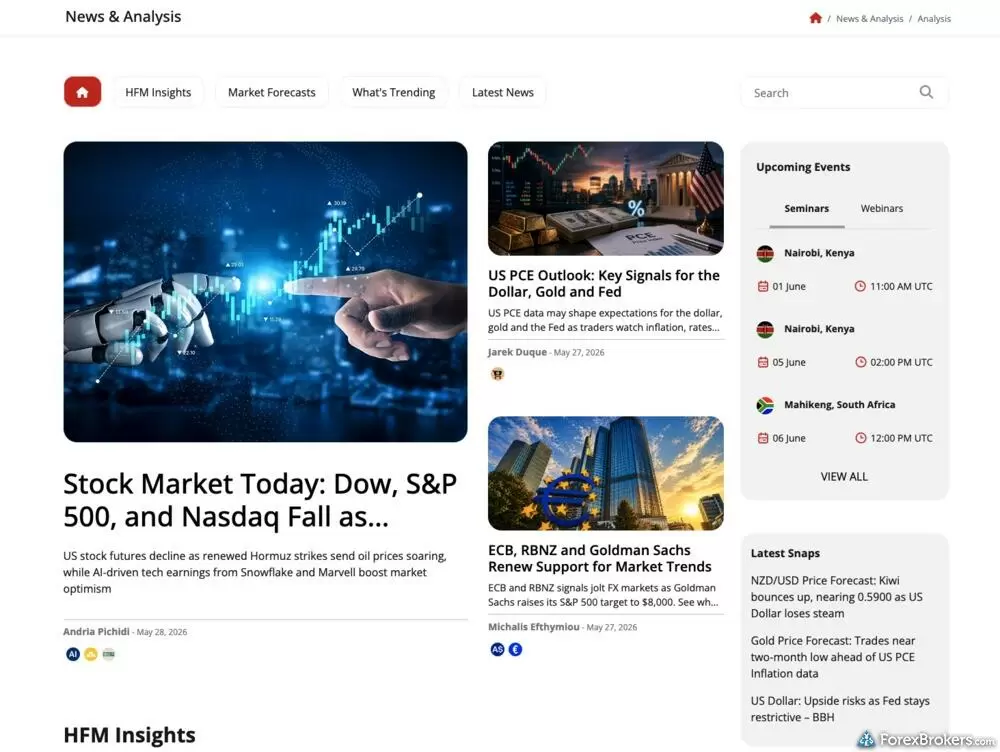
The HFM website incorporates a structured informational workspace that divides daily commentary into scannable subcategories, including Market Forecasts and HFM Insights. This dashboard offers written coverage on macroeconomic topics ranging from global equity updates to major central bank policies.
Third-party plugins: Autochartist and HFM's AI-driven Advanced Insights run as MetaTrader plugins on the desktop platform, where most of the broker's signal and sentiment-driven research lives. TradingView, Trading Central, and TipRanks are not part of the offering. Client sentiment data is surfaced through the plugin layer alongside news-to-market matching widgets. For traders who want signals and sentiment without leaving their charting platform, that is a workable setup. However, for traders who want a unified research dashboard inside the broker's own platform, it is a step short.
Podcasts: Podcasts round out the offering with around 10 audio recordings of roughly an hour each, covering scalping, day trading risk management, and trading psychology. The podcast page does not surface recording dates, which made it hard to tell which episodes were recent.
Available research tools
Our analysis highlights daily in-house analyst articles, weekly Live Market View webinars, and a FxStreet-powered news and economic calendar, alongside Autochartist and Advanced Insights inside MetaTrader; TradingView, Trading Central, and TipRanks are not available.
| Feature |
HFM
|
|---|---|
| Forex News (Top-Tier Sources) | Yes |
| Daily Market Commentary (Articles) | Yes |
| Daily Market Commentary (Videos) | No |
| Economic Calendar | Yes |
| Research - Earnings Calendar | Yes |
| Acuity Trading | Yes |
| Autochartist | Yes |
| TipRanks | No |
| Trading Central | No |
| Mobile Research - News | Yes |
| Mobile Research - Economic Calendar | Yes |
| Mobile Research - Market Movers | No |
Education
HFM's education library is aimed squarely at beginners. The broker runs a beginner course of around 55 minutes broken into 11 bite-sized clips of 3 to 5 minutes apiece, taught by Andria Pichidi and Michalis Efthymiou, who bring more than a decade of combined market experience between them. The clips are well-recorded and the subject matter is handled competently, but the format is shallow by design and the lessons are not paired with written articles, quizzes, or any form of progress tracking.
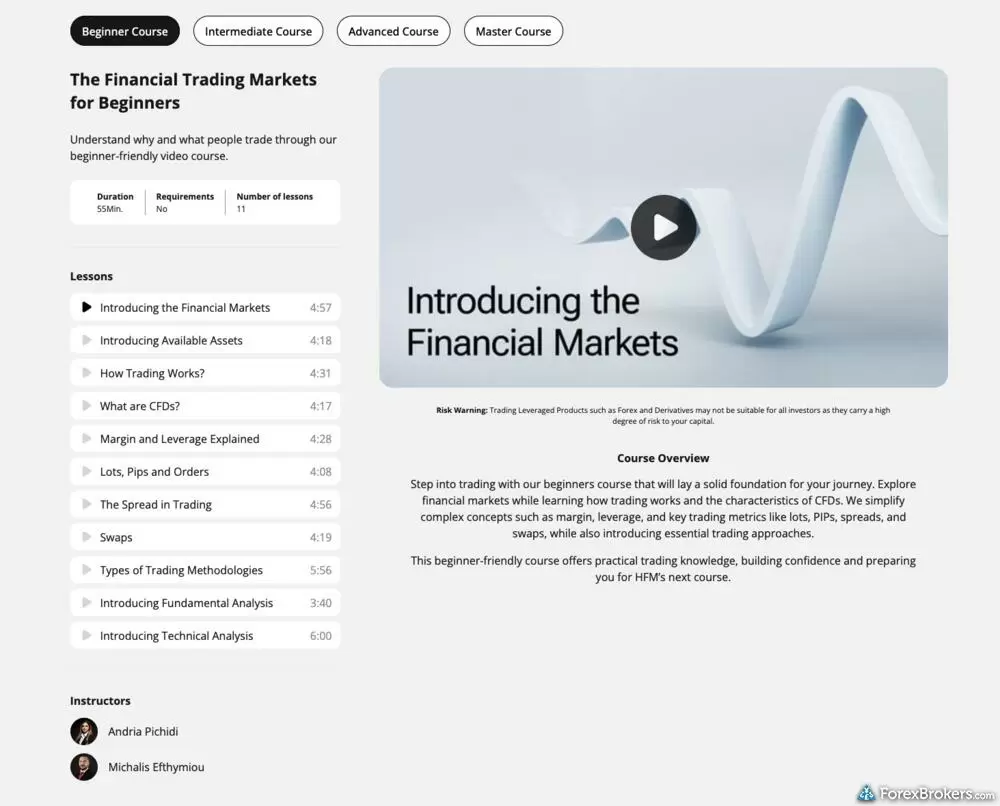
The HFM educational portal features a structured training module titled "The Financial Trading Markets for Beginners." The interface organizes its video-based material into a chronological sequence of eleven distinct lessons, systematically introducing topics such as contract specifications, margin mechanics, and the basics of both fundamental and technical analysis.
Platform tutorials: There is a small set of platform walkthrough videos on the broker's YouTube channel, including how to download MT4 on Android and how to choose a strategy provider on the copy trading platform. The website's tools section adds help-center style articles for VPS Hosting, Autochartist, Trading Calculators, and Advanced Insights. The video library is thin compared with the structured platform tutorials I have tested on more education-forward brokers.
Webinars and contextual learning: The mobile app surfaces upcoming webinars by language with a one-tap registration flow, which is one of the cleanest webinar discovery experiences I have used on a mobile broker app. Contextual learning inside the trade ticket is sparser as there are no tooltips on the mobile app's order dialogue, no asset descriptions beyond the full security name (AUDJPY shows "Australian Dollar vs Japanese Yen"), and no guided trade-ticket walkthrough for new clients. Error messages on invalid prices or out-of-range trade sizes are present and legible, which is the bar most brokers clear.
Available educational offerings
We found a beginner-friendly course library with bite-sized video lessons, supplemented by podcasts, multilingual webinars, and platform-specific articles. Progress tracking, quizzes, and structured assessments are not part of the curriculum.
| Feature |
HFM
|
|---|---|
| Education (Forex) | Yes |
| Education (CFDs) | Yes |
| Education (Crypto) | No |
| Education (Stocks) | Yes |
| Education Area (Website) | Yes |
| Education Area (Mobile App) | Yes |
| Webinars | Yes |
| Videos - Beginner Trading Videos | Yes |
| Videos - Advanced Trading Videos | Yes |
Final thoughts
HFM gives MetaTrader-first traders a reasonable home for MT4 and MT5 with a copy trading service bundled into the mobile app and a quality news feed from FxStreet. What holds it back from competing with the top forex brokers we review is a 344-symbol product offering, an EUR/USD spread that sits above the cheapest providers, and business terms that explicitly target scalping, arbitrage, and AI-assisted analysis of the platform.
If you want MetaTrader plus integrated copy trading from a multi-regulated broker, HFM is a workable choice. If you're focused on tight spreads, deep research with TradingView or Trading Central, or active strategy flexibility, other alternatives from among the very best forex brokers we cover may be a better fit.
HFM's Star Ratings
| Feature |
HFM
|
|---|---|
| Overall Rating |
|
| Trust Score | 85 |
| Range of Investments |
|
| Trading Fees |
|
| Trading Platforms |
|
| Research |
|
| Mobile Trading |
|
| Education |
|
Our testing
Why you should trust us
Steven Hatzakis is a well-known finance writer, with 25+ years of experience in the foreign exchange and financial markets. He is the Global Director of Online Broker Research for Reink Media Group, leading research efforts for ForexBrokers.com since 2016. Steven is an expert writer and researcher who has published over 1,000 articles covering the foreign exchange markets and cryptocurrency industries. He has served as a registered commodity futures representative for domestic and internationally-regulated brokerages. Steven holds a Series III license in the US as a Commodity Trading Advisor (CTA).
All content on ForexBrokers.com is handwritten by a writer, fact-checked by a member of our research team, and edited and published by an editor. Our ratings, rankings, and opinions are entirely our own, and the result of our extensive research and decades of collective experience covering the forex industry.
Ultimately, our rigorous data validation process yields an error rate of less than .1% each year, providing site visitors with quality data they can trust. Click here to learn more about how we test.
How we tested
At ForexBrokers.com, our online broker reviews are based on our collected quantitative data as well as the observations and qualified opinions of our expert researchers. Each year we publish tens of thousands of words of research on the top forex brokers and monitor dozens of international regulator agencies (read more about how we calculate Trust Score here).
Mobile testing is conducted on modern devices that run the most up-to-date operating systems available:
- For Apple, we use MacBook Pro laptops running macOS 15.3, and the iPhone XS running iOS 18.3.
- For Android, we use the Samsung Galaxy S20 and Samsung Galaxy S23 Ultra devices running Android OS 15.
All websites and web-based platforms are tested using the latest version of the Google Chrome browser.
Our researchers thoroughly test a wide range of key features, such as the availability and quality of watch lists, mobile charting, real-time and streaming quotes, and educational resources – among other important variables. We also evaluate the overall design of the mobile experience, and look for a fluid user experience moving between mobile and desktop platforms.
Forex Risk Disclaimer
There is a very high degree of risk involved in trading securities. With respect to margin-based foreign exchange trading, off-exchange derivatives, and cryptocurrencies, there is considerable exposure to risk, including but not limited to, leverage, creditworthiness, limited regulatory protection and market volatility that may substantially affect the price, or liquidity of a currency or related instrument. It should not be assumed that the methods, techniques, or indicators presented in these products will be profitable, or that they will not result in losses. Read more on forex trading risks.
Read next
- Best Forex Brokers for 2026
- Best Forex Brokers for Beginners of 2026
- Best MetaTrader 4 (MT4) Brokers for 2026
- Best Low Spread Forex Brokers for 2026
- Compare Forex Brokers
- International Forex Brokers Search
- Best Copy Trading Platforms for 2026
- Best Brokers for TradingView for 2026
- Best Forex Trading Apps for 2026
More Forex Guides
- Best Forex Brokers with APIs for 2026
- Best Brokers for TradingView for 2026
- Best MetaTrader 5 (MT5) Forex Brokers for 2026
- Best PayPal Forex Brokers for 2026
- Best Forex Demo Accounts for 2026
- Best Forex Options Brokers for 2026
- Best Brokers that Use TipRanks in 2026
- Best High-Leverage Forex Brokers for 2026
- Best Algo Trading Software for 2026
- Best Market Maker Brokers in 2026
- Best Trading Platforms for Mac Users of 2026
- Best Crypto Brokers for 2026
- Best CFD Trading Platforms for 2026
- Best Free Forex Trading Courses for 2026
- Best Forex Day Trading Platforms for 2026
- Best MetaTrader 4 (MT4) Brokers for 2026
- Best High-Frequency Trading Software for 2026
- Best Forex Signal Providers for 2026
Popular Forex Broker Reviews
IC Markets’ competitive pricing and scalable execution make it an excellent option for algorithmic traders.
Steven Hatzakis May 04, 2026
IG offers the ultimate comprehensive trading package, featuring excellent trading and research tools, and industry-leading education.
Steven Hatzakis May 21, 2026
Traders choose Swissquote for its quality research and vast multi-asset offering.
Steven Hatzakis May 04, 2026
Saxo is an exclusive multi-asset broker with brilliant research and a superb trading platform experience – and a selection of over 40,000 s securities.
Steven Hatzakis May 04, 2026
Is Capital.com worth it in 2026? Our expert review covers 400+ crypto CFDs, a 0.64-pip EUR/USD spread, commission-free pricing, and platform quality.
Steven Hatzakis May 07, 2026
A trusted global brand, OANDA stands out for its reputation and quality market research.
Steven Hatzakis May 04, 2026
In my 2026 Exness review, I tested the Exness Terminal, MT4, and MT5 across 78 forex pairs. See my verdict on costs, research, and product range.
Steven Hatzakis May 27, 2026
Interactive Brokers is a highly trusted multi-asset broker with an extensive offering of tradeable global markets.
Steven Hatzakis May 04, 2026
Check out our review of Charles Schwab, a highly trusted, multi-asset broker catering to U.S.-based and international forex traders.
Steven Hatzakis May 04, 2026
Backed by StoneX Group, City Index is a trusted brand known for its versatile trading platforms, excellent mobile app, and diverse market research.
Steven Hatzakis May 15, 2026
As a trusted multi-asset broker, XTB offers outstanding customer service, a wide variety of forex and CFDs, and an excellent overall trading experience.
Steven Hatzakis May 04, 2026
Octa offers a basic, low-cost MetaTrader platform experience alongside its social copy-trading platform.
Steven Hatzakis May 04, 2026
Eightcap review 2026: low-cost forex and CFD trading on TradingView, MetaTrader, and TradeLocker, with a deep crypto CFD lineup. Read our expert verdict.
Steven Hatzakis June 04, 2026
FP Markets shines as a low-cost broker for trading forex and CFDs – as long as you use the MetaTrader platform.
Steven Hatzakis May 04, 2026
AvaTrade is a trusted global brand best known for offering an extensive selection of trading platforms for forex and CFD traders.
Steven Hatzakis May 04, 2026
FxPro competes among the top MetaTrader brokers, featuring multiple account options and various execution methods.
Steven Hatzakis May 15, 2026
ACY Securities is a MetaTrader-only broker with a reasonable range of markets and a balanced account offering.
Steven Hatzakis May 04, 2026
Best known for its mobile trading app, Trading 212 offers an easy-to-use trading platform suite for CFD and share trading.
Steven Hatzakis May 14, 2026
For traders who appreciate advanced trading tools and quality market research, FXCM is a winner, especially for algorithmic trading.
Steven Hatzakis May 04, 2026
Traders choose Admiral Markets (Admirals) for its excellent investor education and advanced MetaTrader features.
Steven Hatzakis May 04, 2026
CMC Markets is well-trusted across the globe, and delivers a terrific trading experience thanks to its excellent pricing and nearly 12,000 tradeable instruments
Steven Hatzakis May 15, 2026
Our expert Tickmill review tests the broker's Raw account pricing, spreads, MetaTrader platforms, and tools to help you decide if it fits your trading in 2026.
Steven Hatzakis May 22, 2026
Pepperstone offers a growing range of tradeable markets, good-quality research, and support for multiple social copy trading platforms.
Steven Hatzakis May 14, 2026
Plus500 is a trusted global brand that offers an easy-to-use trading platform for online traders, alongside access to share trading and selection of CFDs.
Steven Hatzakis May 04, 2026
eToro is a winner for its easy-to-use copy-trading platform, where traders can copy the trades of experienced investors – or receive exclusive perks for sharing.
Steven Hatzakis May 14, 2026
FOREX.com is a trusted brand that delivers an excellent trading experience for forex and CFDs traders across the globe.
Steven Hatzakis May 04, 2026About HFM
HF Markets (HFM), founded in 2010, operates a global multi-entity structure under the HF Markets Group umbrella, with regulated subsidiaries serving clients across Europe, the Middle East, Africa, and Asia. The broker holds 2 Tier-1 licenses (Highly Trusted) and 3 Tier-2 licenses (Trusted), alongside 2 Tier-4 licenses in offshore jurisdictions; product, leverage, and account availability vary by your country of residence and the entity that holds the account. Previously branded as HotForex, the company rebranded to HFM in 2022 and continues to operate the same group of regulated subsidiaries.
About the Editorial Team
Steven Hatzakis is the Global Director of Online Broker Research for ForexBrokers.com. Steven previously served as an Editor for Finance Magnates, where he authored over 1,000 published articles about the online finance industry. A forex industry expert and an active fintech and crypto researcher, Steven advises blockchain companies at the board level and holds a Series III license in the U.S. as a Commodity Trading Advisor (CTA).
Jeff Anberg is a Senior Editor at ForexBrokers.com. Along with years of experience in media distribution at a global newsroom, Jeff has a versatile knowledge base encompassing the technology and financial markets. He is a long-time active investor and engages in research on emerging markets like cryptocurrency. Jeff holds a Bachelor’s Degree in English Literature with a minor in Philosophy from San Francisco State University.
Blain Reinkensmeyer has 20 years of trading experience with over 2,500 trades placed during that time. He heads research for all U.S.-based brokerages on StockBrokers.com and is respected by executives as the leading expert covering the online broker industry. Blain’s insights have been featured in the New York Times, Wall Street Journal, Forbes, and the Chicago Tribune, among other media outlets.