 IG
IG FOREX.com
 CMC Markets
 XTB
XTB eToro
eToro AvaTrade
 Pepperstone
 FP Markets
 Tickmill
Exness Review

Written by Steven Hatzakis
Director of Online Broker Research

Edited by Jeff Anberg
Senior Editor

Fact-checked by Joey Shadeck
Research Analyst
Steven HatzakisDirector of Online Broker Research
Steven Hatzakis is the Global Director of Online Broker Research for ForexBrokers.com. He is a forex industry expert and an active fintech and crypto researcher.


CFDs are complex instruments and come with a high risk of losing money rapidly due to leverage. Trading is risky. You should consider whether you understand how CFDs work and whether you can afford to take the high risk of losing your money.
For this 2026 Exness review, I spent considerable time inside its full platform offering, which includes the Exness Terminal web app, the Exness Trade mobile app, and the broker's branded MT4 and MT5 builds. I placed live trades on EUR/USD and XAU/USD, evaluated the trade ticket through both regular and one-click modes, measured indicator counts across the charts, and benchmarked Exness's account structure and execution against the multi-asset and forex-first leaders we cover.
Exness is best suited for forex and CFD traders who care most about execution polish, a clean trade ticket, and the MetaTrader ecosystem. You'll find drag-to-modify orders on both web and mobile, integrated TradingView charting, and competitive commission pricing of $3.5 per side on the Raw Spread and Zero accounts. Where Exness falls short is in product range (just 239 tradeable symbols on the proprietary web platform), research depth, and the recent wind-down of its copy trading offering.
-
Minimum Deposit:
$100 -
Trust Score:
80 -
Tradeable Symbols (Total):
239
| Range of Investments | |
| Trading Fees | |
| Trading Platforms | |
| Research | |
| Mobile Trading | |
| Education |
Check out ForexBrokers.com's picks for the best forex brokers in 2026.
| 2026 | #31 |
| 2025 | #41 |
| 2024 | #51 |
| 2023 | #43 |
 Why you can trust us
Led by Steven Hatzakis, Global Director of Online Broker Research, the ForexBrokers.com research team collects and audits data across more than 100 variables. We analyze key tools and features important to forex and CFD traders and collect data on commissions, spreads, and fees across the industry to help you find the best broker for your needs.
We also review each broker’s regulatory status; this research helps us determine whether you should trust the broker to keep your money safe. As part of this effort, we track 100+ international regulatory agencies to power our proprietary Trust Score rating system.
Our researchers open personal brokerage accounts and test all available platforms on desktop, web, and mobile for each broker reviewed on ForexBrokers.com. Learn more about how we test.
Can I open an account with this broker?
Use our country selector tool to view available brokers in your country.
Table of Contents
Exness pros and cons
Pros
- Drag-to-modify stop-loss and take-profit pre-trade and mid-trade, on web and mobile.
- Integrated TradingView charts with 106 indicators, plus toggle to the native chart library.
- Risk calculator inside the mobile trade ticket sizes the order from a dollar or equity-percentage input.
Cons
- Just 239 tradeable symbols on the proprietary web platform; product range is narrow versus multi-asset peers.
- Copy trading is being phased out and is no longer onboarding new users.
- No OCO orders, trailing stops, or depth of market on the proprietary platform.
My top takeaways for Exness in 2026:
- Drag-to-modify stop-loss and take-profit on the Exness Terminal web platform and the Exness Trade mobile app, both before and after the order is placed.
- 78 forex pairs and 30 crypto CFDs alongside roughly a hundred stock CFDs; 239 total tradeable symbols on the web platform and 348 on MT5.
- Trade ticket sizes risk as a dollar value, a pip count, or a percentage of account equity, which I rarely see at this level of polish.
- Active-trader commission of $3.5 per side ($7 per round turn) on the Raw Spread and Zero accounts, with the Zero account structured for higher-volume traders.
- Copy trading is being wound down and is no longer accepting new clients, which weighs on the offering for social traders.
Trust Score
Developed by ForexBrokers.com and in use for nearly 10 years, Trust Score is a proprietary rating system powered by a range of unique quantitative and qualitative metrics, including each company’s number of regulatory licenses. Trust Scores range from 1 to 99 (the higher a broker’s rating, the better). Learn more.
Is Exness safe?

Exness is considered Trusted, with an overall Trust Score of 80 out of 99. Exness is not publicly traded and does not operate a bank, but is authorised by two Tier-1 regulators (Highly Trusted), three Tier-2 regulators (Trusted), zero Tier-3 regulator (Average Risk), and three Tier-4 regulators (High Risk). Exness is authorised by the following Tier-1 regulators: Financial Conduct Authority (FCA) and regulated in the European Union via the MiFID passporting system..
It is worth noting that Exness's U.K. (FCA) and Cyprus (CySEC) entities, the broker's only Tier-1 licensed entities, do not currently onboard retail clients. Retail traders are routed to the broker's offshore entities, which is the trade-off behind Exness's higher available leverage.
| Feature |
 Exness Exness
|
|---|---|
| Year Founded | 2008 |
| Publicly Traded (Listed) | No |
| Bank | No |
| Tier-1 Licenses | 2 |
| Tier-2 Licenses | 3 |
| Tier-3 Licenses | 0 |
| Tier-4 Licenses | 3 |
Range of investments
Exness's product catalog is narrower than the other multi-asset leaders we cover. I counted 78 forex pairs in the proprietary platform. Alongside that, there are 30 crypto CFDs and six crypto cross pairs, ten indices including the S&P 500, NASDAQ 100, Dow Jones, DAX, FTSE, and Nikkei, commodities including gold, silver, oil, and other energy, and a stock CFD lineup of roughly a hundred names. The total comes to 239 tradeable symbols on the web platform, with MT5 stretching that to 348. For a forex-first trader, the currency offering is more than adequate. But for anyone wanting tokenized equities, futures, options, ETFs, or a deeper single-stock universe, this is not the broker for you.
Cryptocurrency: 30 crypto CFDs and six crypto crosses are tradeable through Exness, but only as CFDs against the dollar or against other assets like gold and the yen, never the underlying token. The lineup is competitive against typical forex broker peers, but is dwarfed by dedicated crypto exchanges if direct ownership matters to you.
Stocks and indices: The stock CFD lineup covers the most-traded U.S. and global single names, alongside roughly ten major indices. There is no underlying stock ownership, only CFDs, and ETFs are not offered. Agricultural commodities are not on the catalog either.
Leverage: Leverage varies by the Exness entity that holds your account and your country of residence. The broker offers unlimited leverage on some account variants, which I would never recommend taking, as it carries an outsized risk of catastrophic loss.
Available investment products
During our audit, we verified access to 78 forex pairs on the Exness Terminal web platform, alongside CFDs covering indices, commodities, crypto, and equities, totaling 239 tradeable symbols. MT5 carries the broader catalog at 348 symbols.
| Feature |
Exness
|
|---|---|
| Tradeable Symbols (Total) | 239 |
| Forex Pairs (Total) | 78 |
| Forex trading (Spot) | No |
| Forex trading (CFDs) | Yes |
| Forex trading (Options) | No |
| Forex trading (Futures) | No |
| Forex trading (Crypto) | Yes |
| Commodities: Agriculturals | No |
| Commodities: Oil | Yes |
| Commodities: Gold | Yes |
| Commodities: Silver | Yes |
| U.S. Stocks (Shares) | No |
| U.S. Stocks (CFDs) | Yes |
| U.S. Stocks (Crypto) | No |
| Global Stocks (Non-U.S. Shares) | No |
| Global Stocks (Non-U.S. CFDs) | Yes |
| 24/5 Trading (U.S. Stocks - Shares) | No |
| 24/5 Trading (U.S. Stocks - CFDs) | No |
| 24/7 Trading (Crypto) | No |
| Prediction markets | No |
| Copy Trading | No |
| Bitcoin (BTC) | Yes |
| Ethereum (ETH) | Yes |
| Cryptocurrencies (Total) | 30 |
| Cryptocurrency (Underlying) | No |
| Cryptocurrency (CFDs) | Yes |
| Cryptocurrency (Futures) | No |
| Disclaimers | Note: Crypto CFDs are not available to retail traders from any broker's U.K. entity, nor to U.K. residents (except to Professional clients). |
Available funding options
Our tests confirm support for bank wire transfers, debit and credit cards, e-wallets including Skrill and Neteller, and a range of cryptocurrencies routed through the client portal's wallet section. PayPal, Apple Pay, Google Pay, and non-wire bank transfers are not currently available.
| Feature |
Exness
|
|---|---|
| Debit card (Deposit/withdraw) | Yes |
| Credit card (Deposit/withdraw) | Yes |
| Bank Wire (Deposit/Withdraw) | Yes |
| Non-wire bank transfer | No |
| Apple Pay (Deposit/Withdraw) | No |
| Google Pay (Deposit/Withdraw) | No |
| Crypto (Deposit/withdraw) | Yes |
| Cryptocurrency (Wallet transfers) | No |
| PayPal (Deposit/Withdraw) | No |
| Skrill (Deposit/Withdraw) | Yes |
| Neteller (Deposit/Withdraw) | Yes |
Exness fees
Exness's cost structure is competitive once you move past the spread-only Standard and Standard Cent accounts. The broker offers five primary account types: Standard and Standard Cent ($100 minimum, spread-only), and Pro, Raw Spread, and Zero ($1,000 minimum). The Raw Spread and Zero accounts charge a commission of $3.5 per side ($7 per round turn), which is the conventional active trader pricing benchmark, and the Zero account is structured with deeper commission discounts for higher-volume traders.
There is no inactivity fee, and international wire transfers are processed at no cost on the broker's side. Minimum deposits start at $100 for Standard and Standard Cent, climbing to $1,000 for the three Pro-tier accounts. Exness's Premier Program, its closest equivalent to a formal active trader program, tiers benefits by accrued deposits and quarterly trading volumes, but it offers lifestyle perks at the higher rungs rather than direct commission or spread discounts, which I'd prefer to see for active traders.
Financing and overnight carry: Swap rates vary by instrument and account, with swap long and swap short flagged inside the trade ticket via a hover icon (a touch I appreciated during testing). Exness's Islamic, or swap-free, account is available for traders observing Sharia compliance, with the same trading conditions as the equivalent commission and spread-only accounts.
Non-trading fees: Beyond the absent inactivity fee, non-trading costs are minimal. Cryptocurrency deposits and withdrawals sit within the client portal's wallet, with no broker-side wire fees. Guaranteed stop-loss orders are not offered, so there is no GSLO premium to budget for.
Trading fees
In our live pricing analysis, we observed a $3.5 per side commission on the Raw Spread and Zero accounts ($7 per round turn). We confirmed no inactivity fee and no international wire transfer charge during our evaluation.
| Feature |
Exness
|
|---|---|
| Average spread (EUR/USD) - Standard account | N/A |
| Average spread (EUR/USD) - Active trader account | N/A |
| Commission per trade (EUR/USD) - Standard account | N/A |
| Commission per trade (EUR/USD) - Active trader account | $3.5 |
| Inactivity Fee | No |
| International Wire Fee | $0 |
| Minimum Deposit | $100 |
Account types
We confirmed the presence of Standard, Standard Cent, Pro, Raw Spread, and Zero account variants during our evaluation, alongside an Islamic (swap-free) option and the Premier active-trader program. A formal VIP tier is not offered.
| Feature |
Exness
|
|---|---|
| Variable Spreads | Yes |
| Fixed Spreads | No |
| Active Trader Program | Yes |
| VIP/Premium Account | No |
| Professional Account | Yes |
| Islamic Account | Yes |
Mobile trading apps
I came away convinced after extended testing that the Exness Trade mobile app sits well above the average forex broker app. Placing a trade takes three simple taps: open the market tab, click buy or sell, then confirm. The ability to drag-to-modify your stop-loss and take-profit pre-trade is also a feature I rarely see in a mobile build. The bottom navigation (Accounts, Trade, Insights, Performance, Profile) keeps the layout uncluttered, and the search bar is intelligent enough to double as a light screener: type "EUR" and you get every euro pair sorted by largest daily percentage change.
Charting: Charts on mobile run in two libraries, the broker's own and TradingView, and you can toggle between them inside the app, which is uncommon. Counted together, the two libraries offer close to 200 indicators; the broker's native chart alone offers nearly 100. Twelve timeframes are available, which covers most workflows, though sub-minute intervals and additional intraday options beyond H1, H2, and H4 are missing. Trendlines do not sync across devices, but watchlists and favorited items do.
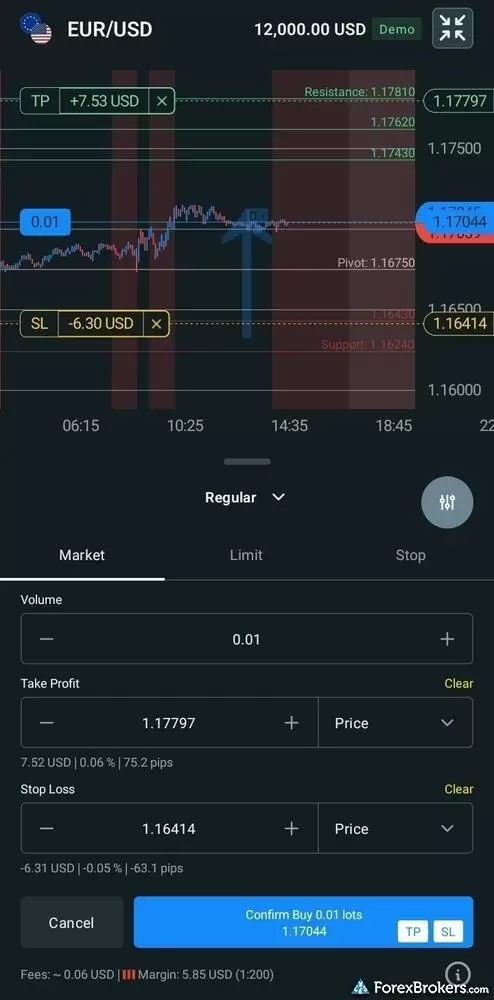
Using the Exness mobile app to trade from the chart, using the drag to modify feature to add a stop loss limit.
Order management: The order ticket is minimalist and defaults to a compact view so the underlying chart stays visible while you set stops and targets. Complex order types (OCO, trailing stop) are not supported on the proprietary app, which is a real limitation. Instead, the MT4 and MT5 mobile apps must fill that gap. The risk calculator inside the trade ticket is one feature I'd flag specifically: specify how much you want to risk in dollars or as a percentage of equity, and the calculator returns the corresponding trade size. On a XAU/USD test, $100 of risk at my leverage came back as 2.86 lots, instantly.
Discovery: Beyond a single favorites list, you cannot create custom watchlists, which leaves ten predefined category lists and two dynamic lists (Top Movers, Most Traded). Volatility tooling is limited to integrated Trading Central signals plotted on the charts. Customizable screeners are absent.
Special tools: Toggling between demo and live accounts is a single tap, which I appreciate from a workflow standpoint. Copy trading is being discontinued and is no longer accepting new users, which weighs against the broker's standing as a social-trading destination. Generative AI client-facing tools are not yet part of the experience.
Available mobile platforms and tools
In our hands-on testing, we found 100 built-in charting indicators on the broker's native mobile library, alongside an integrated TradingView library, dynamic watchlists, and a contextual risk calculator inside the trade ticket. The app does not yet support custom watchlist creation or OCO orders.
| Feature |
Exness
|
|---|---|
| Proprietary Mobile Trading App | Yes |
| Android App | Yes |
| Apple iOS App | Yes |
| Mobile Price Alerts | Yes |
| Mobile Charting - Draw Trendlines | Yes |
| Mobile Charting - Trendlines Autosave | No |
| Mobile Charting - Indicators / Studies | 100 |
| Mobile Charting - Indicators Autosave | No |
| Mobile Watchlists - Column Filtering | No |
| Mobile Watchlists - Column Customization | Yes |
| Mobile Watchlists - Create & Manage | Yes |
| Mobile Watchlists - Syncing | Yes |
Trading platforms
Exness offers two MetaTrader builds (MT4 and MT5) alongside its proprietary Exness Terminal web platform. Terminal is responsive and modular, built around a TradingView chart engine. The feature I rate highest is being able to place stop-loss and take-profit orders before the trade is even open, and then drag each marker to its target price directly on the chart. Most platforms reserve drag-to-modify for after the position opens, but Exness handles both.
Charting via TradingView: Terminal's charts are powered by TradingView with 106 technical indicators, and you can save your indicator setup as a layout that reloads across devices. 15 timeframes ship by default, from 1-minute candles up to a yearly interval, and the platform lets you define custom intervals from anything above one minute, a touch I appreciated. Sub-minute charts are not available, which is a TradingView premium-tier limitation rather than an Exness one.
Order ticket: The trade ticket is one of the cleaner ones I've worked through this year. Risk can be entered as a price, a pip count, a dollar value, or a percentage of account equity. The percentage option is uncommon and how I personally trade. As soon as you bump the percentage up, the resulting price level, pip distance, and profit potential update in real time. What is missing are OCO orders, trailing stops, depth of market, and a risk/reward ratio readout inside the ticket. However, the broker's MetaTrader suite covers the advanced order types via MT4 and MT5.
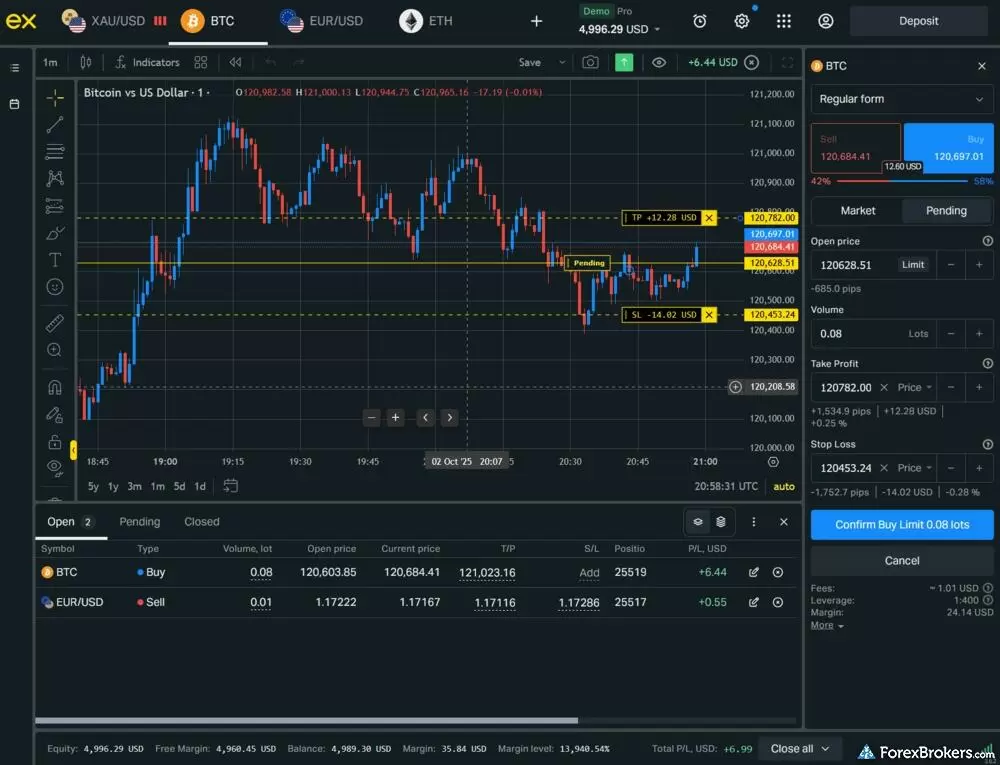
You are able to trade from the chart and see open positions on the Exness web terminal.
Close All and special tools: A Close All button lets you flatten every position with one click, with the option to close only winners, only losers, or only buys or sells. It is not technically an order type, but functionally it behaves like one, and I used it often during testing. Backtesting, algorithmic trading, and a trading journal are not available in Terminal. However, all three are available through MetaTrader, where Exness offers a VPS for clients who meet either a $2,000 account balance or a $500 balance with $1.5 million in trading volume. A retail API is not offered (Exness's API is reserved for partners).
Steven's take
The Performance section in the client portal is very basic: a recap of your lifetime return and profitable versus unprofitable trade count, but no detailed risk-reward metrics. A good step toward performance analytics, but a ways to go to match category leaders.
Steven Hatzakis
Director of Online Broker Research
MetaTrader: MT4 and MT5 ship branded with the Exness logo when downloaded from the broker, and unbranded if downloaded from the developer (in which case you connect to Exness via manual server credentials). I counted 348 tradeable symbols on MT5 versus 239 on the proprietary platform. If a specific market matters to you, check both before signing up. Pricing is account-bound, not platform-bound, so cost structures are identical across MT4, MT5, and Terminal.
Navigation footnote: One annoyance with Terminal is that it is at its best only in full-screen mode. Between full-screen and the mobile-responsive layout there is a compressed mid-state I found cluttered, so I resized either large or small to avoid it. Worth noting too that Exness's website is increasingly funneled through the client portal, which streamlines parts of the experience but can feel restrictive when you're trying to browse the broker's blog or marketing pages the traditional way.
Available trading platforms and features
Our platform walkthrough verified 106 charting indicators inside Terminal, integrated Trading Central analysis threaded across charts and watchlists, and a one-click Close All across open positions. Terminal excludes OCO orders, trailing stops, depth of market, and an in-platform trading journal.
| Feature |
Exness
|
|---|---|
| Desktop Platform (Windows) | Yes |
| Desktop Platform (Mac) | Yes |
| MetaTrader 4 (MT4) | Yes |
| MetaTrader 5 (MT5) | Yes |
| FX Blue | No |
| Proprietary Desktop Trading Platform | Yes |
| Proprietary Web Trading Platform | Yes |
| TradingView | No |
| cTrader | No |
| Algorithmic trading | Yes |
| API Access | No |
| Charts can be saved | Yes |
| Client sentiment data | No |
| Trading Signals | Yes |
| Price Alerts | Yes |
| Virtual Private Server (VPS) | Yes |
| Virtual Trading (Demo) | Yes |
| Charting - Indicators / Studies (Total) | 106 |
| Charting - Trade From Chart | Yes |
| Charting - TradingView | Yes |
Available order types
We verified the availability of market, limit, and stop orders directly within Terminal's trade ticket. Trailing stops, OCO, OTO, and guaranteed stop-loss orders are not offered on the proprietary platform; trailing stops are available via MT4 and MT5.
| Feature |
Exness
|
|---|---|
| Order Type - Market | Yes |
| Order Type - Limit | Yes |
| Order Type - Stop | Yes |
| Order Type - Trailing Stop | Yes |
| Order Type - OCO | No |
| Order Type - OTO | No |
| Order Type - GSLO | No |
Research
Exness's research stack is functional rather than deep. The mobile Insights tab streams headlines from FXStreet and overlays Trading Central technical analysis on charts and watchlists, which is the bulk of what's on offer. FXStreet articles include featured images and pair nicely with the economic calendar, though I noticed some of the content reads as walls of text without paragraph spacing on mobile, a small but persistent annoyance. In-house video sits on Exness's YouTube channel, including the weekly Trading Talks podcast and the Born To Trade series.
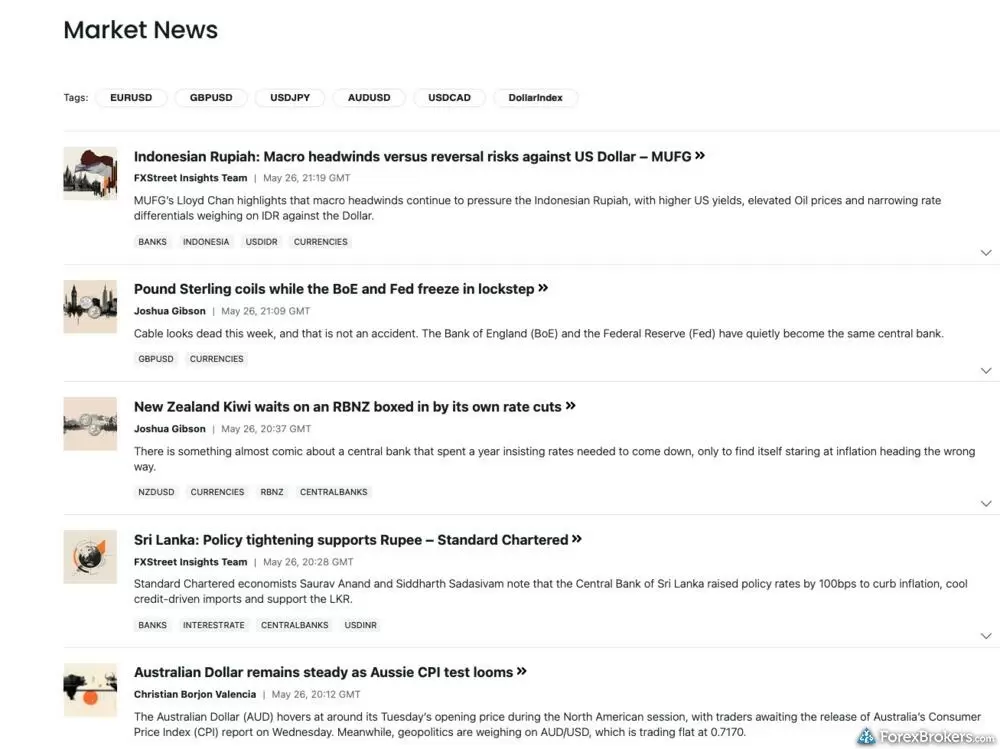
The Exness client portal includes a dedicated market news section featuring a headline feed powered by FXStreet. This interface displays recent macroeconomic and fundamental updates covering a variety of global and emerging market currencies.
Trading Central integration: The Trading Central slice is the most useful piece of the research stack. Inside Terminal, support and resistance pivots plot directly on the chart with a directional arrow indicating intraday bias. By clicking the arrow, the full analysis pops in a hover window. While the complete Trading Central suite is not offered, the integrated slice is threaded carefully throughout both the charts and the watchlist. Acuity, Autochartist, and TipRanks are not available.
Fundamentals and sentiment: The economic calendar inside the client portal is solid, with actual, forecast, and previous values plotted across a history bar chart, filterable by event severity and country. The version inside Terminal is the Trading Central calendar, which is leaner. Earnings calendars, macro research reports, financial statement data, and a client sentiment index are not part of the offering. Trading signals via Trading Central cover forex, crypto, stocks, indices, and commodities with target prices and pivot levels.
Live programming: The broker runs a live stream roughly once or twice per week with realtime market analysis, alongside the Born To Trade and Trading Talks podcasts archived on YouTube. Daily live coverage would be a meaningful upgrade as the best brokers in this category publish multiple analysis pieces per day across asset classes.
Available research tools
Our analysis highlights integrated Trading Central signals across five asset classes, FXStreet news feeds inside the mobile Insights tab, and a weekly market analysis cadence on YouTube. Acuity, Autochartist, TipRanks, client sentiment data, and macro research reports are not offered.
| Feature |
Exness
|
|---|---|
| Forex News (Top-Tier Sources) | Yes |
| Daily Market Commentary (Articles) | Yes |
| Daily Market Commentary (Videos) | Yes |
| Economic Calendar | Yes |
| Research - Earnings Calendar | No |
| Acuity Trading | No |
| Autochartist | No |
| TipRanks | No |
| Trading Central | Yes |
| Mobile Research - News | Yes |
| Mobile Research - Economic Calendar | Yes |
| Mobile Research - Market Movers | Yes |
Education
Exness's education library is materially thinner than it was a couple of years ago. The broker has discontinued its standalone Insights blog, folding most of its written content into the client portal where it now reads more as support resources and contract specifications than as structured learning. Educational content has largely migrated to YouTube. The result is workable for a self-directed trader who wants to spot-check a topic, but underwhelming for anyone serious about progressing from being a beginner to intermediate or expert trader through a structured curriculum.
Video content: The YouTube channel is well organized into playlists, including the Trading Talks weekly podcast and the Born To Trade series. The broker's analysts have real market experience and the content reflects it. Even so, video volume is moderate and the absence of supporting written curricula leaves the offering incomplete. Region- and language-specific sub-channels exist alongside the main English channel.
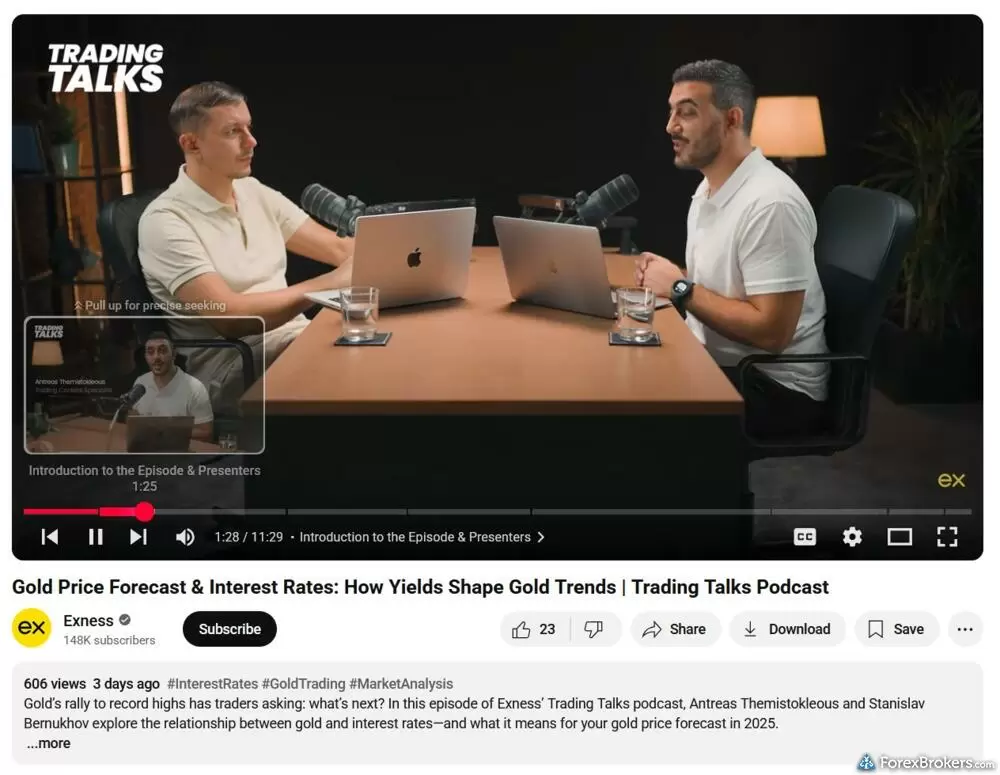
Exness produces a variety of slick and engaging YouTube videos and podcasts on market developments.
Platform tutorials and tools: There are a handful of tool pages (currency converter, risk calculator) and a Help Center inside the client portal, but few dedicated platform tutorials and no structured course library. Quizzes are not offered. Progress tracking is not offered. The Economic Calendar landing page itself is bare.
Contextual education in the trade ticket: This is the bright spot of the broker's educational offering. The order ticket carries hover-icon definitions for swap long, swap short, stop-loss, and take-profit, and invalid values render in red with the maximum permissible value flagged inline, which is a clean, in-context way to teach. Asset-page descriptions, however, are minimal, with the symbol and underlying pair only, and no contract specifications or trading hours.
Available educational offerings
We found a structured YouTube library, contextual education built into Terminal's trade ticket, and a Help Center inside the client portal. Structured courses, quizzes, and progress tracking are not offered.
| Feature |
Exness
|
|---|---|
| Education (Forex) | Yes |
| Education (CFDs) | Yes |
| Education (Crypto) | Yes |
| Education (Stocks) | Yes |
| Education Area (Website) | No |
| Education Area (Mobile App) | No |
| Webinars | Yes |
| Videos - Beginner Trading Videos | Yes |
| Videos - Advanced Trading Videos | Yes |
Final thoughts
Exness has carved out a real niche for MetaTrader-focused or forex-only traders who care about execution polish and a clean trade ticket more than they care about broad product range, deep research, or a structured learning path. The Exness Terminal web platform and the mobile app both do drag-to-modify well, and the in-ticket risk calculator on mobile is one of the more useful UX touches I've encountered this year.
Exness was recognized in our 2026 Annual Awards for being Best in Class for MetaTrader, which is consistent with the strength of its MT4 and MT5 offering. Where Exness loses ground is on four fronts. Range of investments is narrow at 239 symbols on the web platform. Research depth is thin, with no Acuity, Autochartist, TipRanks, macro reports, or client sentiment data. Copy trading is being wound down. And the education library has materially thinned out over the past year.
For a forex-first or MetaTrader-first trader who already knows what they want, and is willing to lean on Trading Central for analysis, Exness is a credible option. However, if you want a multi-asset catalog, deep research, or a beginner-to-advanced education pathway, I'd point you to the best forex brokers in the industry.
Exness's Star Ratings
| Feature |
Exness
|
|---|---|
| Overall Rating |
|
| Trust Score | 80 |
| Range of Investments |
|
| Trading Fees |
|
| Trading Platforms |
|
| Research |
|
| Mobile Trading |
|
| Education |
|
Our testing
Why you should trust us
Steven Hatzakis is a well-known finance writer, with 25+ years of experience in the foreign exchange and financial markets. He is the Global Director of Online Broker Research for Reink Media Group, leading research efforts for ForexBrokers.com since 2016. Steven is an expert writer and researcher who has published over 1,000 articles covering the foreign exchange markets and cryptocurrency industries. He has served as a registered commodity futures representative for domestic and internationally-regulated brokerages. Steven holds a Series III license in the US as a Commodity Trading Advisor (CTA).
All content on ForexBrokers.com is handwritten by a writer, fact-checked by a member of our research team, and edited and published by an editor. Our ratings, rankings, and opinions are entirely our own, and the result of our extensive research and decades of collective experience covering the forex industry.
Ultimately, our rigorous data validation process yields an error rate of less than .1% each year, providing site visitors with quality data they can trust. Click here to learn more about how we test.
How we tested
At ForexBrokers.com, our online broker reviews are based on our collected quantitative data as well as the observations and qualified opinions of our expert researchers. Each year we publish tens of thousands of words of research on the top forex brokers and monitor dozens of international regulator agencies (read more about how we calculate Trust Score here).
Mobile testing is conducted on modern devices that run the most up-to-date operating systems available:
- For Apple, we use MacBook Pro laptops running macOS 15.3, and the iPhone XS running iOS 18.3.
- For Android, we use the Samsung Galaxy S20 and Samsung Galaxy S23 Ultra devices running Android OS 15.
All websites and web-based platforms are tested using the latest version of the Google Chrome browser.
Our researchers thoroughly test a wide range of key features, such as the availability and quality of watch lists, mobile charting, real-time and streaming quotes, and educational resources – among other important variables. We also evaluate the overall design of the mobile experience, and look for a fluid user experience moving between mobile and desktop platforms.
Forex Risk Disclaimer
There is a very high degree of risk involved in trading securities. With respect to margin-based foreign exchange trading, off-exchange derivatives, and cryptocurrencies, there is considerable exposure to risk, including but not limited to, leverage, creditworthiness, limited regulatory protection and market volatility that may substantially affect the price, or liquidity of a currency or related instrument. It should not be assumed that the methods, techniques, or indicators presented in these products will be profitable, or that they will not result in losses. Read more on forex trading risks.
Read next
Octa offers a basic, low-cost MetaTrader platform experience alongside its social copy-trading platform.
Steven Hatzakis May 04, 2026
Pepperstone offers a growing range of tradeable markets, good-quality research, and support for multiple social copy trading platforms.
Steven Hatzakis June 16, 2026
Our 2026 HFM (HF Markets) review covers MT4, MT5, copy trading, the 344-symbol product offering, and 1.8-pip EUR/USD spreads, based on hands-on testing.
Steven Hatzakis May 29, 2026
XM Group is a MetaTrader-only broker that offers a strong selection of high-quality educational content and market research.
Steven Hatzakis May 04, 2026
BlackBull Markets is a plain-vanilla MetaTrader broker with a growing range of products and support for a handful of third-party social copy trading platforms.
Steven Hatzakis May 04, 2026Popular Guides
- Compare Forex Brokers
- Best Forex Trading Apps for 2026
- Best Forex Brokers for 2026
- Best MetaTrader 4 (MT4) Brokers for 2026
- Best Low Spread Forex Brokers for 2026
- International Forex Brokers Search
- Best Copy Trading Platforms for 2026
- Best Forex Brokers for Beginners of 2026
- Best Brokers for TradingView for 2026
More Forex Guides
- Best Forex Signal Providers for 2026
- Best High-Leverage Forex Brokers for 2026
- Best Algo Trading Software for 2026
- Best Brokers that Use TipRanks in 2026
- Best MetaTrader 4 (MT4) Brokers for 2026
- Best Brokers for TradingView for 2026
- Best Forex Options Brokers for 2026
- Best PayPal Forex Brokers for 2026
- Best CFD Trading Platforms for 2026
- Best Forex Brokers with APIs for 2026
- Best Trading Platforms for Mac Users of 2026
- Best Free Forex Trading Courses for 2026
- Best High-Frequency Trading Software for 2026
- Best Market Maker Brokers in 2026
- Best Crypto Brokers for 2026
- Best MetaTrader 5 (MT5) Forex Brokers for 2026
- Best Forex Demo Accounts for 2026
- Best Forex Day Trading Platforms for 2026
About Exness
Founded in 2008, Exness has grown into one of the largest global forex brokers by trading volume, operating across regulated entities including the FCA in the U.K., CySEC in Cyprus, the FSCA in South Africa, the CMA in Kenya, the JSC in Jordan, the FSA in Seychelles, the FSC in Mauritius, the FSC in the British Virgin Islands, and additional offshore jurisdictions. Exness's U.K. and Cyprus entities, the broker's only Tier-1 licensed entities, do not currently onboard retail clients; retail traders are routed to the offshore entities. Exness is also a member of the Financial Commission, an External Dispute Resolution organization.
About the Editorial Team
Steven Hatzakis is the Global Director of Online Broker Research for ForexBrokers.com. Steven previously served as an Editor for Finance Magnates, where he authored over 1,000 published articles about the online finance industry. A forex industry expert and an active fintech and crypto researcher, Steven advises blockchain companies at the board level and holds a Series III license in the U.S. as a Commodity Trading Advisor (CTA).
Jeff Anberg is a Senior Editor at ForexBrokers.com. Along with years of experience in media distribution at a global newsroom, Jeff has a versatile knowledge base encompassing the technology and financial markets. He is a long-time active investor and engages in research on emerging markets like cryptocurrency. Jeff holds a Bachelor’s Degree in English Literature with a minor in Philosophy from San Francisco State University.
Joey Shadeck is a Content Strategist and Research Analyst for ForexBrokers.com. He holds dual degrees in Finance and Marketing from Oakland University, and has been an active trader and investor for close to ten years. An industry veteran, Joey obtains and verifies data, conducts research, and analyzes and validates our content.