 IG
IG FOREX.com
 CMC Markets
 XTB
XTB eToro
eToro AvaTrade
 Pepperstone
 FP Markets
 Tickmill
Best Forex Demo Accounts for 2026

Written by Steven Hatzakis
Director of Online Broker Research

Edited by Jeff Anberg
Senior Editor

Fact-checked by Joey Shadeck
Research Analyst
Steven HatzakisDirector of Online Broker Research
Steven Hatzakis is the Global Director of Online Broker Research for ForexBrokers.com. He is a forex industry expert and an active fintech and crypto researcher.


 Why you can trust us
Led by Steven Hatzakis, Global Director of Online Broker Research, the ForexBrokers.com research team collects and audits data across more than 100 variables. We analyze key tools and features important to forex and CFD traders and collect data on commissions, spreads, and fees across the industry to help you find the best broker for your needs.
We also review each broker’s regulatory status; this research helps us determine whether you should trust the broker to keep your money safe. As part of this effort, we track 100+ international regulatory agencies to power our proprietary Trust Score rating system.
Our researchers open personal brokerage accounts and test all available platforms on desktop, web, and mobile for each broker reviewed on ForexBrokers.com. Learn more about how we test.
A forex demo account, sometimes called paper trading or virtual trading, is the closest thing to a free trial of a broker's live platform. After 25 years of testing the industry, I've found that the best forex demo accounts share three things. They mirror live execution faithfully, they give you access to multiple trading platforms, and the broker builds a real learning path around them.
For this 2026 guide, I tested the demo accounts at 36 forex brokers across their proprietary platforms, MetaTrader 4 and 5, TradingView, and any third-party software each broker supports. The nine brokers below are the ones that earned a spot, ranked by how well their paper trading environment serves real traders, from extensive multi-platform demos at IG to the single copy trading-focused app at eToro.
| Company | Average spread (EUR/USD) - Standard account | Minimum Deposit | Overall Rating |
 IG IG
|
0.91 | £1 |
|
 Interactive Brokers Interactive Brokers
|
0.226 | $0 |
|
 Saxo Saxo
|
1.0 | $0 |
|
 FOREX.com FOREX.com
|
1.00 | $100 |
|
 CMC Markets CMC Markets
|
1.3 | $0 |
|
 Charles Schwab Charles Schwab
|
1.27 | $0 |
|
 XTB XTB
|
0.92 | $0 |
|
Best forex brokers for demo accounts
All nine brokers below clear the same baseline with a free demo account on real-time market data, mobile app access alongside web, and a path from paper trading to live without restrictive hoops. They're ranked by platform variety, order-type depth, and the quality of the analytics and education wrapped around the demo itself.
Here are my picks for the best forex demo accounts in 2026.
- Minimum Deposit: £1
- Trust Score: 99
- Tradeable Symbols (Total): 19537
Multi-asset broker with 11 regulatory licenses across eight Tier-1 jurisdictions. Demo runs across five platforms, proprietary web and mobile, MT4, MT5, TradingView, ProRealTime, and the L2 Dealer DMA venue, with a £1 retail minimum when you're ready to fund. Read full review
- Five-platform demo lineup including MT4, MT5, and TradingView
- 33 indicators with drag-to-modify stops and limits on a pre-trade basis
- £1 minimum to fund a live account
- No native copy trading
- IG Academy course catalog has stagnated
- MetaTrader instrument list is significantly thinner than the proprietary platform
- Minimum Deposit: $0
- Trust Score: 99
- Tradeable Symbols (Total): 8500
Professional-grade multi-asset broker with a Trust Score of 99 and over $779 billion in client equity. Demo provides access to 105 cash forex pairs across 170+ global markets on the same TWS, IBKR Desktop, Client Portal, and TradingView that are popular with advanced traders. Read full review
- Demo across TWS, IBKR Desktop, Client Portal, mobile, and TradingView
- 127 studies on TWS with complex orders (Basket, OCA)
- 105 cash forex pairs and 170+ global markets
- TWS is overwhelming for first-time demo users
- No MetaTrader 4 or 5
- $2 minimum commission per side carries to live trading
- Minimum Deposit: $0
- Trust Score: 99
- Tradeable Symbols (Total): 71000
Multi-asset broker with 71,000+ instruments, seven Tier-1 regulatory licenses, and three banking entities across Denmark, Luxembourg, and Switzerland. Demo runs on the same SaxoTrader platform live clients use; the broker won #1 Desktop Platform and #1 Research at our 2026 Annual Awards. Read full review
- 71,000+ instruments including forex, FX options, NDFs, CFDs, futures, and bonds
- SaxoTrader syncs charts and watchlists across web, desktop, and mobile
- 13+ algorithmic order types plus OCO and GSLO in the demo ticket
- No drag-to-modify orders on charts
- No MetaTrader 4 or 5
- Education lacks progress tracking or quizzes
- Minimum Deposit: $100
- Trust Score: 99
- Tradeable Symbols (Total): 5500
StoneX-owned broker offering full MetaTrader support alongside a proprietary Web Trading platform. Demo mirrors live market conditions across MT4, MT5, and the proprietary platform in the same environment — the only major U.S.-regulated broker with all three. Read full review
- Demo on MT4, MT5, and proprietary Web Trading in one environment
- TradingView-powered charting with roughly 90 indicators
- Trading Academy includes progress tracking and quizzes
- Standard account spreads average 1.62 pips on EUR/USD in the U.S.
- Advanced Trading desktop platform no longer maintained
- RAW account commissions need high volume to become competitive
- Minimum Deposit: $0
- Trust Score: 99
- Tradeable Symbols (Total): 12029
Publicly traded U.K. broker offering the widest forex menu in the guide. There are 282 currency pairs (141 quoted in both directions, so USD/EUR runs alongside EUR/USD) on the proprietary Next Generation platform. Read full review
- 282 forex pairs including reverse quotes
- 80 indicators plus unique Breakout and Emerging Patterns tools
- Next Generation platform spans web, desktop, and mobile demo
- No automated trading on the proprietary platform
- MT4 instrument list is much thinner than Next Generation
- Education lacks progress tracking or quizzes
- Minimum Deposit: $0
- Trust Score: 99
- Tradeable Symbols (Total): 40000
Largest U.S. broker by assets ($10T+ AUM) with the thinkorswim platform inherited from TD Ameritrade. Demo provides access to thinkorswim's full toolkit, though forex trading is U.S.-only and limited to roughly 70 currency pairs. Read full review
- thinkorswim demo carries hundreds of indicators
- Advanced order types including "1st triggers sequence" and "Blast all"
- Tick chart updates with each price change
- Forex trading is U.S.-only
- Limited to ~70 currency pairs
- No MetaTrader, no TradingView integration
- Minimum Deposit: $0
- Trust Score: 96
- Tradeable Symbols (Total): 10900
Publicly traded multi-asset broker built around the proprietary xStation 5 platform. Won 2026 honors for Beginners and Ease of Use; the demo is beginner-friendly with 200+ Knowledge Base lessons backing the platform itself. Read full review
- xStation 5 demo is highly polished and beginner-friendly
- 200+ Knowledge Base lessons with quizzes
- Client sentiment data integrated into the platform
- Only one platform in demo; no MetaTrader, TradingView, or third-party options
- Only 39 charting indicators
- No API, algorithmic trading, or GSLO
CFDs are complex instruments and come with a high risk of losing money rapidly due to leverage. Between 51% and 89% of retail investor accounts lose money when trading CFDs. You should consider whether you understand how CFDs work and whether you can afford to take the high risk of losing your money.
Top picks for demo accounts
1. IG – Best overall for forex demo accounts
| Company | Overall Rating | Minimum Deposit | Average spread (EUR/USD) - Standard account | Virtual Trading (Demo) |
|
IG
|
|
£1 | 0.91 | Yes |
A demo account is only as useful as the live environment it mirrors, and IG gives you five distinct platforms to test drive before risking real money: the proprietary web and mobile apps, MetaTrader 4 and 5, TradingView, ProRealTime, and the L2 Dealer DMA venue. Backed by 11 regulatory licenses across eight Tier-1 jurisdictions and a £1 retail minimum when you're ready to fund, IG sets the benchmark for paper trading on any of these apps.
A demo that maps to the platform you'll actually use: Most brokers give you one demo environment. IG lets you spin up paper accounts across the proprietary web app, MT4, MT5, and TradingView, with 97 forex pairs and roughly 17,000 CFDs on the flagship platform. The web platform's charting carries 33 indicators, 17 timeframes down to 1-second and tick charts, and 20 drawing tools, which is the same toolkit you'd inherit on day one of a live account. Drag-to-modify stops and limits work pre-trade, so practicing risk/reward setups feels closer to live execution than the static order tickets most demos default to.
Steven's take
"IG's demo is the closest match to a real account I've tested, with the same five platforms, the same charting depth, and a £1 step to live when you're ready to stop paper trading."
Steven Hatzakis
Director of Online Broker Research
Contextual learning while you paper trade: The web platform ships with an interactive in-app tutorial, and the trade ticket surfaces tooltips for Force Open/Net Off logic plus inline error messaging when stops are placed too tight. IG Academy adds 10 structured courses with progress tracking and quizzes, although the catalog has stagnated and leans heavily toward foundational forex rather than equities or options. The MetaTrader instrument list at IG is also significantly thinner than the proprietary platform, so a demo run on MT5 won't show the full menu.

The IG web platform features integrated video on its charting as well as a full layout combining a watchlist with relevant news headlines.
2. Interactive Brokers – Best demo for advanced traders
| Company | Overall Rating | Minimum Deposit | Average spread (EUR/USD) - Standard account | Virtual Trading (Demo) |
|
Interactive Brokers
|
|
$0 | 0.226 | Yes |
A demo account at Interactive Brokers is the closest you can get to a professional desk without funding one. You can paper trade across Trader Workstation (TWS), the simplified IBKR Desktop, the web Client Portal, mobile, and TradingView. Any of these allows you access to 105 cash forex pairs across 170+ global markets.
Where to start if TWS feels overwhelming: The advanced Trader Workstation packs 127 studies, complex orders like Basket and OCA, and watchlists configurable across 650+ columns. This is the depth that makes TWS intimidating on day one. Beginners would be better off starting the demo in IBKR Desktop instead. You have the same access to forex and CFD markets, news from Reuters and Dow Jones at the order ticket, and TradingView charting with 98 indicators inside the Client Portal. Once you are more proficient in the basics, upgrade to TWS for the FXTrader terminal and advanced order types.
The trade-offs your demo won't fix: Two limits are worth knowing before you commit to opening a demo account. IBKR doesn't offer MetaTrader 4 or 5, so if you want to test EA-based strategies on MT5, this isn't the place. The $2 minimum commission per side also carries to live, which makes IBKR proportionally expensive below standard 100k lot sizes. This is good to keep in mind during paper trading so your demo position sizing reflects real cost. U.S. retail clients should also note that trading live spot forex with leverage requires Eligible Contract Participant status, regardless of demo eligibility.
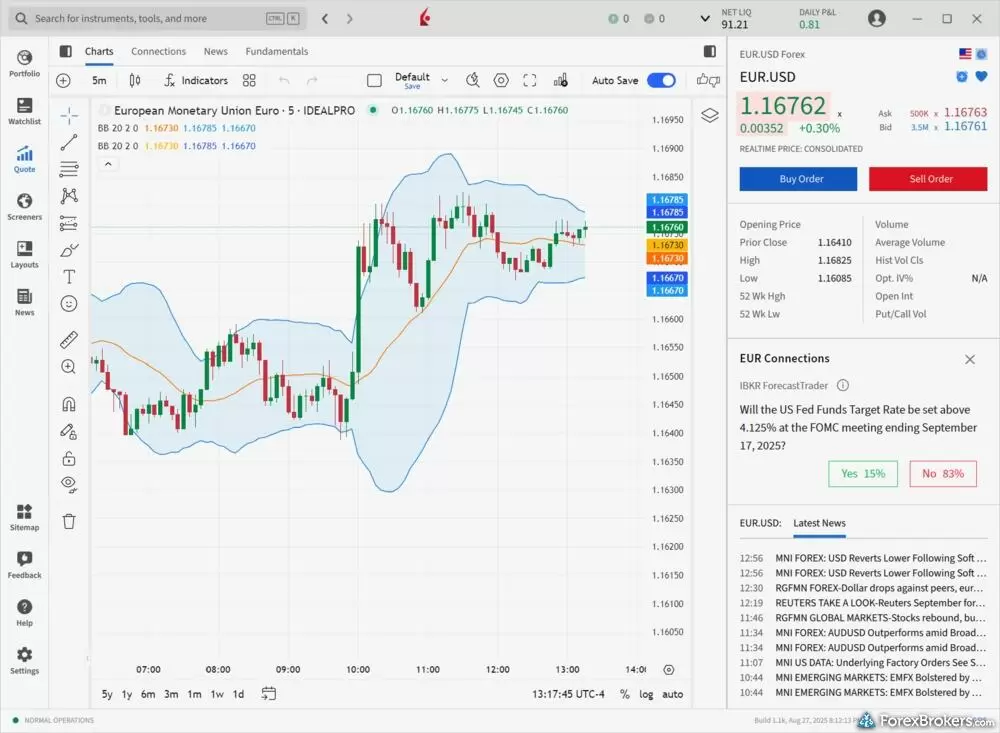
My layout on the IBKR Desktop platform includes a chart of the EUR/USD pair, a trading panel, and news headlines from Reuters.
3. Saxo - Best demo for multi-asset paper trading
| Company | Overall Rating | Minimum Deposit | Average spread (EUR/USD) - Standard account | Virtual Trading (Demo) |
|
Saxo
|
|
$0 | 1.0 | Yes |
Saxo turns a demo account into a genuine multi-asset rehearsal with 71,000+ instruments, including spot forex, FX options, NDFs, CFDs, stocks, futures, and 33,000 bonds, all sitting inside the same SaxoTrader platform you'd use to trade live. Backed by seven Tier-1 regulatory licenses, a perfect Trust Score of 99, and three banking entities across Denmark, Luxembourg, and Switzerland, Saxo gives paper traders an environment closer to a private bank's terminal than a typical retail demo.
What you can paper trade across SaxoTrader: Across SaxoTrader's web, desktop, and mobile apps, watchlists and charts sync between devices. You are able to start a demo session on desktop and continue on the phone with trend lines and indicators intact. Charting carries 62 indicators, 20 drawing tools, and nine chart types, with countdown timers per candle on desktop. The desktop demo also exposes streaming Level 2 order books, FX Global Code-aligned execution, and at least 13 algorithmic order types. These are tools most retail paper traders never touch elsewhere. OCO and GSLO orders are both in the demo ticket.
Where the demo falls short: Two demo-specific gaps are worth flagging. SaxoTrader still doesn't support drag-to-modify on charts, so practicing on-chart stop and limit adjustments, increasingly the retail-platform standard, has to be done from the trade ticket. The other absence is more strategic. There is no MetaTrader 4 or 5, so if your demo plan is to test EAs or scripts on MT, Saxo isn't on the list. Education is the soft spot, too. The videos and articles are strong, but there's no progress tracking or quizzes to scaffold a beginner working through paper trades.

SaxoTraderGO "Hot Topics" feature upcoming educational and research webinars as well as past webinars.
4. FOREX.com – Best demo with full MetaTrader support
| Company | Overall Rating | Minimum Deposit | Average spread (EUR/USD) - Standard account | Virtual Trading (Demo) |
|
FOREX.com
|
|
$100 | 1.00 | Yes |
FOREX.com is the alternative if MetaTrader is non-negotiable for your demo plan. It's the one major U.S.-regulated broker that supports MT4, MT5, and a proprietary Web Trading platform in the same demo environment.
Where the demo earns its place: The demo mirrors live market conditions across all three platforms, with TradingView-powered charting carrying roughly 90 indicators, OCO and OTO order support, and a VPS for testing automated strategies on MT4/MT5. The Trading Academy adds interactive courses with progress tracking and quizzes, the scaffolding that's missing at Saxo. The honest catch is that standard account spreads average 1.62 pips on EUR/USD, so unless you graduate to the RAW account, the live cost structure you'd inherit is well above what the top three offer. And the Advanced Trading desktop, while still installable, is no longer maintained.
5. CMC Markets – Best demo for range of forex pairs
| Company | Overall Rating | Minimum Deposit | Average spread (EUR/USD) - Standard account | Virtual Trading (Demo) |
|
CMC Markets
|
|
$0 | 1.3 | Yes |
CMC Markets gives demo users the widest forex menu in this guide with 282 currency pairs, since CMC quotes 141 of them in both directions (USD/EUR alongside EUR/USD), all inside its Next Generation platform.
What the Next Generation demo gives you: The Next Generation demo carries 80 technical indicators, 40 drawing tools, and unique Breakout and Emerging Patterns tools that auto-adjust as you change the timescale, which is useful when practicing entries across multiple chart frames. Drag-to-modify works on the chart, though the activation isn't obvious on first use. Two gaps to mention for paper traders is that there is no automated trading on the proprietary platform (you'd have to switch to MT4 for EA testing and CMC's instrument list on MT4 is much thinner), and the education library lacks progress tracking or quizzes to help orient a beginner.
Other demo accounts I tested
6. Charles Schwab – Best demo for U.S.-based thinkorswim traders
| Company | Overall Rating | Minimum Deposit | Average spread (EUR/USD) - Standard account | Virtual Trading (Demo) |
|
Charles Schwab
|
|
$0 | 1.27 | Yes |
Charles Schwab's thinkorswim demo is one of the most respected in the industry. There are hundreds of indicators, advanced order types like "1st triggers sequence" and "Blast all," and a tick chart that updates with each price change. The catch is that Schwab's forex offering is U.S.-only, limited to roughly 70 currency pairs, and not available outside thinkorswim. No MetaTrader, no TradingView, and EUR/USD spreads near 1.27 pips.
7. XTB – Best demo for beginners on xStation 5
| Company | Overall Rating | Minimum Deposit | Average spread (EUR/USD) - Standard account | Virtual Trading (Demo) |
|
XTB
|
|
$0 | 0.92 | Yes |
xStation 5 is one of the most polished single-platform demo environments. XTB earned 2026 honors in our Annual Awards for Beginners and Ease of Use, with 200+ Knowledge Base lessons (some with quizzes) to assist with a trader's learning curve. The reason it slots in at #7 is that it's the only platform you can demo. There is neither MetaTrader, TradingView, API, nor algorithmic trading available, and only 39 indicators on xStation's charts.
8. eToro – Best demo for copy trading practice
| Company | Overall Rating | Minimum Deposit | Average spread (EUR/USD) - Standard account | Virtual Trading (Demo) |
 eToro eToro
|
|
$50-$10,000 | 1 | Yes |
The $100,000 virtual demo gives eToro a unique angle by allowing users to paper trade alongside the copy trading network and test smart portfolios before allocating real capital. Charting carries 106 TradingView indicators. The structural issue for a serious demo: stop-loss and take-profit can only be set after a position is open, not as part of the pre-trade ticket. That makes it tough to demo the risk management that every trader should be practicing.
9. Plus500 – Best demo for tracking paper trade performance
| Company | Overall Rating | Minimum Deposit | Average spread (EUR/USD) - Standard account | Virtual Trading (Demo) |
 Plus500 Plus500
|
|
€50 | 1.3 | Yes |
The Plus500 WebTrader demo pairs a clean beginner-friendly interface with the +Me performance analytics dashboard, which surfaces patterns from your own paper-trading history. It's a useful tool once you've logged enough demo trades to spot habits. The reason it lands lower in the list is that there's no MetaTrader, TradingView, or third-party platforms. Additionally, charts don't sync between web and mobile, and the 1.3-pip EUR/USD spreads are higher than many competitors once you begin trading real currency.
How do I best take advantage of a forex demo account?
Learning to trade
While any gains or losses generated in a demo trading account shouldn’t be used as an indication of how well you’ll trade with real money, a demo account is still a good way to get started and learn some trading basics or troubleshoot an automated trading script.
I want to emphasize that the results you see in your demo account can vary greatly from results achieved in a live account. For this reason, paper trading accounts are best used to learn how to use the software effectively. Those attempting to test an actual trading strategy are better off using a live account with a small amount of risk capital to provide more realistic results.
Learn more about forex trading
Want to learn more about the fundamentals of forex trading? Check out my in-depth, Forex 101 educational series covering everything you’ll need to know about forex and currency trading. I dive into the ins and outs of leverage, explain how pips work, and more.
Backtesting strategies
Some demo accounts allow you to backtest an automated trading system, such as when using an automated trading strategy with forex trading platforms like MetaTrader or TradingView.
It is important to note that just because a trading strategy performs well within the backtesting environment of a demo account does not mean it will perform well when applied to a live trading environment.
I highly recommend instead testing any live trading strategies with a small amount of real funds to ensure the performance meets your expectations before scaling your investment capital higher.


Testing different signals and tools
Another benefit of using a demo account is that you can access the features available within the platform before using them with real funds in a live account.
For example, if a broker offers forex trading signals within the demo platform, you can test using them by replicating the trade or copying the signal in the demo account.
Be aware that some brokers may restrict access to certain premium features unless you have a live account already. Regardless, a free demo account can be a great way to preview any available features within the software that you want to explore without taking any risk.
Additional advantages
A demo account can complement your learning experience while consuming free educational content from a broker. It can serve as an essential tool while taking a free forex trading course or reading educational articles as it allows you to put some of the theory into practice.
Even for more experienced traders, demo accounts can be useful to reveal possible pain points or troubleshoot errors with your algo trading strategy that you can attempt to redress with assistance from the broker before funding your account with real money.
ForexBrokers.com Overall Rankings
Now that you've seen our picks for the best brokers on this guide, check out ForexBrokers.com's overall broker rankings. We've evaluated 36 forex brokers, using a testing methodology that's based on 100+ data-driven variables and thousands of data points. Also take a look at our full-length, in-depth forex broker reviews.
Day Trading Broker Reviews
IG offers the ultimate comprehensive trading package, featuring excellent trading and research tools, and industry-leading education.
Steven Hatzakis May 21, 2026
CMC Markets is well-trusted across the globe, and delivers a terrific trading experience thanks to its excellent pricing and nearly 12,000 tradeable instruments
Steven Hatzakis May 15, 2026
Saxo is an exclusive multi-asset broker with brilliant research and a superb trading platform experience – and a selection of over 40,000 s securities.
Steven Hatzakis May 04, 2026
FOREX.com is a trusted brand that delivers an excellent trading experience for forex and CFDs traders across the globe.
Steven Hatzakis May 04, 2026
Interactive Brokers is a highly trusted multi-asset broker with an extensive offering of tradeable global markets.
Steven Hatzakis May 04, 2026Related Guides
Forex day trading is a short-term trading strategy where you buy and sell currencies within a single day. Learn how to start day trading forex with this guide.
Steven Hatzakis June 12, 2026
Check out my picks for the best trading platforms for scalping strategies, which deliver order types and tools that are well-suited to fast-paced trading.
Steven Hatzakis May 29, 2026
Learn about high-frequency trading, and how it works, and discover the best forex brokers for HFT trading systems.
Steven Hatzakis June 12, 2026
Check out our picks for the forex brokers offering the best charts, the best charting providers in the industry, and how to navigate charts for forex trading.
Steven Hatzakis June 12, 2026
Zero spread accounts are trading accounts offered by forex brokers that have no difference between the bid and ask price or have spreads that average close to zero.
Steven Hatzakis May 26, 2026Popular Forex Trading Tools and Platform Guides
- Best MetaTrader 4 (MT4) Brokers for 2026
- Best MetaTrader 5 (MT5) Forex Brokers for 2026
- Best Forex Signal Providers for 2026
- Best Brokers for TradingView for 2026
- Best Trading Central Forex Brokers for 2026
- Best Forex Brokers with Trading APIs
More Guides
- Best CFD Trading Platforms for 2026
- Best Free Forex Trading Courses for 2026
- Best MetaTrader 5 (MT5) Forex Brokers for 2026
- Best Forex Brokers with APIs for 2026
- Best High-Leverage Forex Brokers for 2026
- Best Brokers for TradingView for 2026
- Best Forex Signal Providers for 2026
- Best MetaTrader 4 (MT4) Brokers for 2026
- Best Crypto Brokers for 2026
- Best PayPal Forex Brokers for 2026
- Best Forex Day Trading Platforms for 2026
- Best Forex Options Brokers for 2026
- Best Algo Trading Software for 2026
- Best Market Maker Brokers in 2026
- Best High-Frequency Trading Software for 2026
- Best Brokers that Use TipRanks in 2026
- Best Trading Platforms for Mac Users of 2026
Forex Risk Disclaimer
There is a very high degree of risk involved in trading securities. With respect to margin-based foreign exchange trading, off-exchange derivatives, and cryptocurrencies, there is considerable exposure to risk, including but not limited to, leverage, creditworthiness, limited regulatory protection and market volatility that may substantially affect the price, or liquidity of a currency or related instrument. It should not be assumed that the methods, techniques, or indicators presented in these products will be profitable, or that they will not result in losses. Read more on forex trading risks.
About the Editorial Team
Steven Hatzakis is the Global Director of Online Broker Research for ForexBrokers.com. Steven previously served as an Editor for Finance Magnates, where he authored over 1,000 published articles about the online finance industry. A forex industry expert and an active fintech and crypto researcher, Steven advises blockchain companies at the board level and holds a Series III license in the U.S. as a Commodity Trading Advisor (CTA).
Jeff Anberg is a Senior Editor at ForexBrokers.com. Along with years of experience in media distribution at a global newsroom, Jeff has a versatile knowledge base encompassing the technology and financial markets. He is a long-time active investor and engages in research on emerging markets like cryptocurrency. Jeff holds a Bachelor’s Degree in English Literature with a minor in Philosophy from San Francisco State University.
Joey Shadeck is a Content Strategist and Research Analyst for ForexBrokers.com. He holds dual degrees in Finance and Marketing from Oakland University, and has been an active trader and investor for close to ten years. An industry veteran, Joey obtains and verifies data, conducts research, and analyzes and validates our content.