 IG
IG FOREX.com
 CMC Markets
 XTB
XTB eToro
eToro AvaTrade
 Pepperstone
 FP Markets
 Tickmill
Eightcap Review

Written by Steven Hatzakis
Director of Online Broker Research

Edited by Jeff Anberg
Senior Editor

Fact-checked by Blain Reinkensmeyer
Managing Partner
Steven HatzakisDirector of Online Broker Research
Steven Hatzakis is the Global Director of Online Broker Research for ForexBrokers.com. He is a forex industry expert and an active fintech and crypto researcher.


CFDs are complex instruments and come with a high risk of losing money rapidly due to leverage. 74-89% of retail investor accounts lose money when trading CFDs with this provider. You should consider whether you understand how CFDs work and whether you can afford to take the high risk of losing your money.
Eightcap is built for a specific kind of trader: the cost-conscious forex and CFD trader who is comfortable on platforms like TradingView and MetaTrader and wants a deep crypto CFD lineup without paying a premium for it. After linking my account inside TradingView, I flipped on one-click trading, set up a live EUR/USD position in a single tap, coded a custom indicator, and priced spreads across account types in MetaTrader.
Pricing is competitive, with a 1.0 pip average spread on EUR/USD in the Standard account, and the crypto CFD menu runs to roughly 100 coins, deeper than most rivals carry. That said, Eightcap offers no platform of its own, a mid-tier range of markets, and thin research and education (crypto CFDs are also off-limits to U.K. retail clients).
If that doesn't bother you, Eightcap is a strong, low-cost fit.
-
Minimum Deposit:
$100 -
Trust Score:
87 -
Tradeable Symbols (Total):
803
| Range of Investments | |
| Trading Fees | |
| Trading Platforms | |
| Research | |
| Mobile Trading | |
| Education |
Check out ForexBrokers.com's picks for the best forex brokers in 2026.
| 2026 | #30 |
| 2025 | #38 |
| 2024 | #37 |
| 2023 | #34 |
| 2022 | #31 |
| 2021 | #24 |
 Why you can trust us
Led by Steven Hatzakis, Global Director of Online Broker Research, the ForexBrokers.com research team collects and audits data across more than 100 variables. We analyze key tools and features important to forex and CFD traders and collect data on commissions, spreads, and fees across the industry to help you find the best broker for your needs.
We also review each broker’s regulatory status; this research helps us determine whether you should trust the broker to keep your money safe. As part of this effort, we track 100+ international regulatory agencies to power our proprietary Trust Score rating system.
Our researchers open personal brokerage accounts and test all available platforms on desktop, web, and mobile for each broker reviewed on ForexBrokers.com. Learn more about how we test.
Can I open an account with this broker?
Use our country selector tool to view available brokers in your country.
Table of Contents
Eightcap pros and cons
Pros
- Competitive Raw-account pricing, with low spreads plus a $3.50-per-side commission.
- Around 100 crypto CFDs, more than most forex brokers offer.
- A choice of four platforms: TradingView, MetaTrader 4, MetaTrader 5, and TradeLocker.
Cons
- No proprietary platform; relies entirely on third-party software.
- Limited market range, with no options, futures, or direct share dealing.
- Thin research and almost no structured education.
My top takeaways for Eightcap in 2026:
- Average EUR/USD spread of 1.0 pip on the Standard account, plus a commission-based Raw account ($3.50 per side) for tighter spreads.
- Around 100 crypto CFDs, far more than most forex brokers offer (not available to U.K. retail clients).
- A choice of four third-party platforms (TradingView, MetaTrader 4, MetaTrader 5, and TradeLocker), but no proprietary platform of Eightcap's own.
- 803 tradeable symbols including 55 forex pairs, a mid-tier range with no options, futures, or direct share dealing.
- $100 minimum deposit, with no withdrawal fees.
Trust Score
Developed by ForexBrokers.com and in use for nearly 10 years, Trust Score is a proprietary rating system powered by a range of unique quantitative and qualitative metrics, including each company’s number of regulatory licenses. Trust Scores range from 1 to 99 (the higher a broker’s rating, the better). Learn more.
Is Eightcap safe?

Eightcap is considered Trusted, with an overall Trust Score of 87 out of 99. Eightcap is not publicly traded and does not operate a bank, but is authorised by three Tier-1 regulators (Highly Trusted), one Tier-2 regulators (Trusted), zero Tier-3 regulator (Average Risk), and two Tier-4 regulators (High Risk). Eightcap is authorised by the following Tier-1 regulators: Australian Securities & Investment Commission (ASIC), Financial Conduct Authority (FCA), and regulated by CySEC, allowing registration in the European Union via the MiFID passporting system. Regulation varies by entity, so which Eightcap arm holds your account (ASIC in Australia, the FCA in the U.K., CySEC in the EU, or the SCB in the Bahamas) determines both the protections you receive and the maximum leverage available to you.
| Feature |
 Eightcap Eightcap
|
|---|---|
| Year Founded | 2009 |
| Publicly Traded (Listed) | No |
| Bank | No |
| Tier-1 Licenses | 3 |
| Tier-2 Licenses | 1 |
| Tier-3 Licenses | 0 |
| Tier-4 Licenses | 2 |
Range of investments
Eightcap's range of investments sits in the middle of the pack, and which markets you actually see depends on the platform you trade, your country of residence, and the Eightcap entity that holds your account. I counted 55 forex pairs and just under 800 CFDs, totaling 803 tradeable symbols across indices, commodities, share CFDs, and cryptocurrencies. That covers the popular markets most traders want, but it trails the largest multi-asset brokers that list well into the thousands. There are no options, no futures, and no exotic products, and while Eightcap offers a few hundred share CFDs, it does not provide direct shares in the underlying cash equities.
Cryptocurrency: This is where Eightcap separates itself from most forex brokers. I traded from a lineup of around 100 crypto CFDs, far more than the handful of coins most competitors list, and it is the single strongest part of the range. Note that crypto CFDs are not available to retail traders from any broker's U.K. entity, nor to U.K. residents (except Professional clients).
Leverage: Leverage depends on the jurisdiction of the entity holding your account. In the U.K. and EU, retail leverage is capped, which raises the margin required to open a position and helps keep position sizes in check. At the other extreme, Eightcap's Global entity offers as much as 500:1, which I would not recommend to any trader given how sharply it amplifies losses as well as gains. Clients who qualify as elected Professionals can bypass the regional caps, but they give up retail protections in exchange.
Prop challenges: Eightcap also sells prop trading challenges, such as paying $250 for a $10,000 account. These are not live trading accounts; they are educational challenges built to teach disciplined risk management. They can help beginners practice, but I would not treat them as a substitute for trading a funded account.
Available investment products
During our audit, we verified access to 55 forex pairs alongside 803 tradeable symbols spanning indices, commodities, share CFDs, and one of the deeper crypto CFD lineups in the forex space. Options, futures, and direct share dealing are all absent.
| Feature |
Eightcap
|
|---|---|
| Tradeable Symbols (Total) | 803 |
| Forex Pairs (Total) | 55 |
| Forex trading (Spot) | No |
| Forex trading (CFDs) | Yes |
| Forex trading (Options) | No |
| Forex trading (Futures) | No |
| Forex trading (Crypto) | No |
| Commodities: Agriculturals | No |
| Commodities: Oil | Yes |
| Commodities: Gold | Yes |
| Commodities: Silver | Yes |
| U.S. Stocks (Shares) | No |
| U.S. Stocks (CFDs) | Yes |
| U.S. Stocks (Crypto) | No |
| Global Stocks (Non-U.S. Shares) | No |
| Global Stocks (Non-U.S. CFDs) | Yes |
| 24/5 Trading (U.S. Stocks - Shares) | No |
| 24/5 Trading (U.S. Stocks - CFDs) | No |
| 24/7 Trading (Crypto) | No |
| Prediction markets | No |
| Copy Trading | No |
| Bitcoin (BTC) | Yes |
| Ethereum (ETH) | Yes |
| Cryptocurrencies (Total) | 100 |
| Cryptocurrency (Underlying) | No |
| Cryptocurrency (CFDs) | Yes |
| Cryptocurrency (Futures) | No |
| Disclaimers | Note: Crypto CFDs are not available to retail traders from any broker's U.K. entity, nor to U.K. residents (except to Professional clients). |
Available funding options
Our tests confirm support for bank wire, debit and credit cards, PayPal, Skrill, and Neteller, plus cryptocurrency deposits and withdrawals. Apple Pay and Google Pay are not currently available.
| Feature |
Eightcap
|
|---|---|
| Debit card (Deposit/withdraw) | Yes |
| Credit card (Deposit/withdraw) | Yes |
| Bank Wire (Deposit/Withdraw) | Yes |
| Non-wire bank transfer | No |
| Apple Pay (Deposit/Withdraw) | No |
| Google Pay (Deposit/Withdraw) | No |
| Crypto (Deposit/withdraw) | Yes |
| Cryptocurrency (Wallet transfers) | No |
| PayPal (Deposit/Withdraw) | Yes |
| Skrill (Deposit/Withdraw) | Yes |
| Neteller (Deposit/Withdraw) | Yes |
Eightcap fees
Pricing is the strongest part of Eightcap's offering, and it is the main reason I'd point cost-sensitive traders here. Across its entities in Australia, the Bahamas, the U.K., and Cyprus, the broker offers two core account types, and the fees you pay depend on which one you choose. The Standard account is commission-free and priced through the spread. Meanwhile, the Raw account charges a commission but pairs it with much tighter underlying spreads.
On the Standard account I measured an average EUR/USD spread of 1.0 pip, which puts Eightcap toward the lower-cost end of the brokers I review. The Raw account swaps that for a commission of roughly $7 per standard lot round turn ($3.50 per side) on top of low raw spreads, which active traders running size will usually find cheaper. Both accounts open with a minimum deposit of $100, or the equivalent in EUR or GBP.
Overnight financing applies to positions held past the daily rollover, as with any CFD broker, and there is no swap-free Islamic account on offer. Eightcap does not charge for withdrawals, which is a point in its favor. One cost to watch is an inactivity fee of 10 units of your base currency (EUR, GBP, or USD) once an account sits idle for more than three months.
There is no separate VIP tier, though the Professional account carries a few VIP-style perks, including a dedicated account specialist and access to exclusive events and content. Keep in mind that the Professional designation is primarily a regulatory classification governing the rules and protections that apply to you, not a pricing upgrade.
Trading fees
In our live pricing analysis, we measured an average EUR/USD spread of 1.0 pip on the Standard account, with the Raw account trading wider spreads for a $3.50-per-side commission on top of low raw pricing.
| Feature |
Eightcap
|
|---|---|
| Average spread (EUR/USD) - Standard account | 1.0 |
| Average spread (EUR/USD) - Active trader account | 0.06 |
| Commission per trade (EUR/USD) - Standard account | N/A |
| Commission per trade (EUR/USD) - Active trader account | $3.50 |
| Inactivity Fee | Yes |
| International Wire Fee | $0 |
| Minimum Deposit | $100 |
Account types
We confirmed two core tiers during our evaluation, the commission-free Standard account and the commission-based Raw account. There is no swap-free Islamic option and no dedicated active-trader program, though elected Professionals receive a handful of premium perks.
| Feature |
Eightcap
|
|---|---|
| Variable Spreads | Yes |
| Fixed Spreads | No |
| Active Trader Program | No |
| VIP/Premium Account | Yes |
| Professional Account | Yes |
| Islamic Account | No |
Mobile trading apps
Eightcap does not develop a mobile app of its own, so the experience on your phone is whatever third-party software you connect to it: the TradingView app, the MetaTrader 4 and 5 apps, or TradeLocker. I spent most of my mobile testing in the TradingView app after linking my Eightcap account, and the practical takeaway is that you inherit a polished, fast app, but almost none of it is shaped by Eightcap itself.
Navigation: The TradingView app keeps things simple, with a bottom bar for Watchlist, Charts, Explore, Community, and Menu. Once my account was connected, placing a trade took a single tap with one-click trading switched on. Layout personalization is limited on mobile beyond cosmetic theme changes, which is a native app trait rather than anything Eightcap controls.
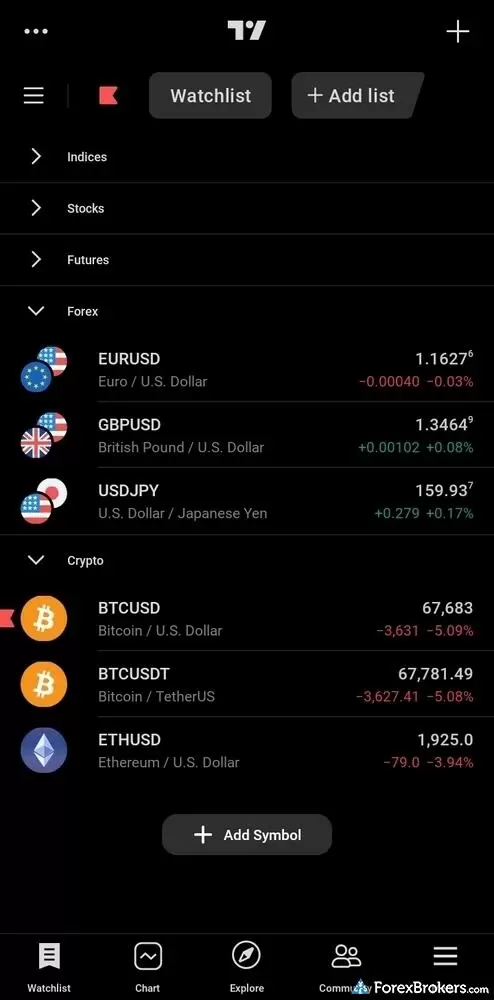
The Eightcap mobile app on TradingView displays a dark themed Watchlist interface. The screen shows financial instruments organized under expandable categories such as Indices, Stocks, Futures, Forex, and Crypto. The layout lists the latest prices, point changes, and daily percentage fluctuations for popular assets like EUR/USD and BTC/USD to provide a clear view of live market data.
Charting: This is the high point. The app ships with roughly 100 indicators, around 20 timeframes from one-minute to monthly on the free plan you get through the broker, and the drag-to-modify behavior I rely on, where you set a stop-loss or take-profit by dragging its line on the chart. Trendlines autosave and sync across devices, so a level I drew on the web showed up on my phone.
Order management: The order ticket lets you size a position in lots, margin, percentage of balance, or cash risk, and it shows the risk-to-reward in both pips and dollars before you commit. Good-til-cancelled orders are supported, but there are no advanced order types here. Trailing stops, for instance, are available only on Eightcap's MetaTrader apps, not in TradingView.
Discovery and tools: Watchlists are flexible, though the free plan caps you at a single custom list, and the screener is web-only. Push notifications and price alerts work well once you find the small alert icon. Two Eightcap-specific gaps are worth calling out: there is no copy trading, since the MetaTrader Signals Market is disabled here, and account performance analytics are underdeveloped across the board.
Available mobile platforms and tools
In our hands-on testing, we counted 100 built-in charting indicators in the TradingView app, alongside cross-device watchlists and price alerts, though Eightcap publishes no proprietary mobile app and adds no tools of its own on top of the third-party software.
| Feature |
Eightcap
|
|---|---|
| Proprietary Mobile Trading App | No |
| Android App | Yes |
| Apple iOS App | Yes |
| Mobile Price Alerts | Yes |
| Mobile Charting - Draw Trendlines | Yes |
| Mobile Charting - Trendlines Autosave | Yes |
| Mobile Charting - Indicators / Studies | 100 |
| Mobile Charting - Indicators Autosave | Yes |
| Mobile Watchlists - Column Filtering | Yes |
| Mobile Watchlists - Column Customization | Yes |
| Mobile Watchlists - Create & Manage | Yes |
| Mobile Watchlists - Syncing | Yes |
Trading platforms
Eightcap runs no proprietary platform, whether web, desktop, or mobile, and instead offers four third-party suites: MetaTrader 4, MetaTrader 5, TradingView, and TradeLocker. That is a respectable spread of options, and it covers most trading styles, but it also means the platform experience is one Eightcap configures rather than builds. I did most of my testing in TradingView and MetaTrader.
Which platforms you can actually open depends on your entity. U.K. clients under the FCA are limited to TradingView, with no MetaTrader, while EU clients under CySEC get MT5 and TradingView but not MT4.
TradingView: On TradingView, custom indicators and automated strategies are fully supported through the Pine Script language, and building a custom indicator and alert was smooth from start to finish. The charts carry around 100 indicators and as many as 32 time intervals, although the default plan you receive through the broker limits the smallest granularity unless you upgrade to a paid TradingView subscription. Drag-to-modify order editing, the integrated screener, a Strong Sell to Strong Buy sentiment gauge, and cross-device syncing of watchlists and layouts are all included.
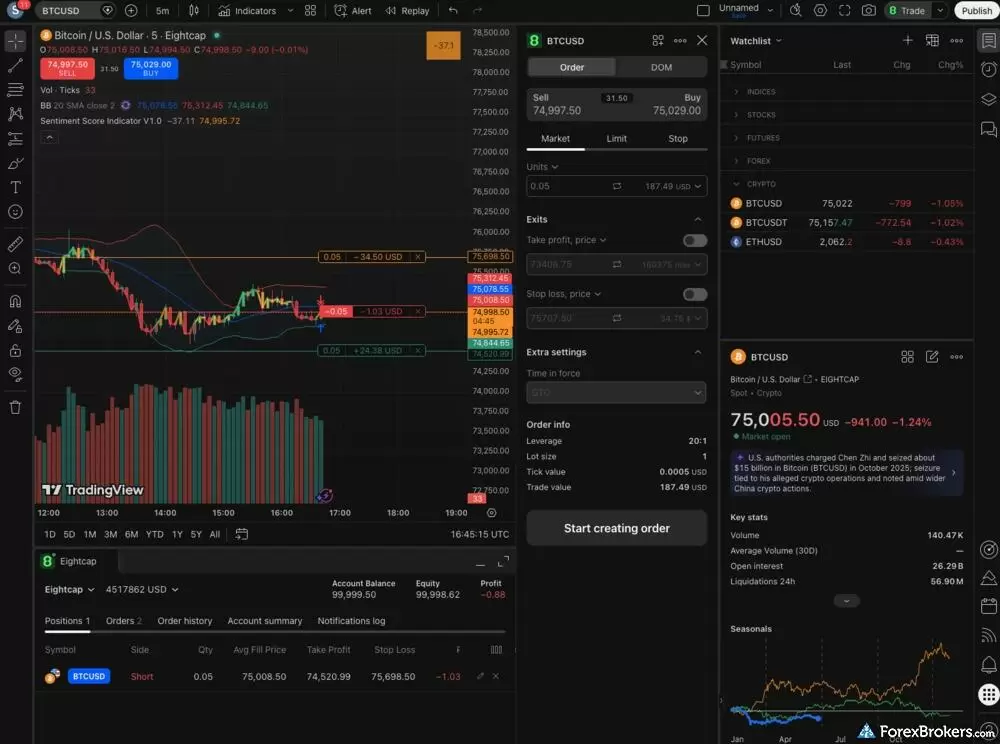
The Eightcap web platform utilizes a TradingView charting layout. The screen centers on a Bitcoin (BTC/USD) candlestick chart that displays active price levels, volume bars, and technical indicators. To the right of the chart, an order ticket allows users to set market or limit orders with defined stop-loss and take-profit parameters. A categorized watchlist occupies the far right panel, while the bottom section tracks active positions and overall account equity.
What you give up on TradingView is order-type depth. There is no OCO or one-triggers-other support, and no trailing stop or guaranteed stop-loss. The platform's depth-of-market window exists but is not enabled for Eightcap. There is also no native trade journal, and the public API Eightcap markets is aimed at brokerages, not retail traders. Copy trading is the most notable absence, as the MetaTrader Signals Market that would let you mirror other traders is switched off at Eightcap.
MetaTrader: The MT4 and MT5 desktop apps download pre-branded from Eightcap, which is more convenient than configuring the server by hand from MetaQuotes. MT5 carries the widest market range, with as many as 800 symbols, and it is where advanced order types like trailing stops live. Eightcap layers on a few extras: FlashTrader, an MT5 plug-in built with BK Forex and offered from the U.K. and EU entities, which attaches stop-loss and take-profit orders to open positions; an Acuity dashboard plug-in; and a VPS that algorithmic traders can use to keep strategies running. The login is not seamless, since you track a separate MetaTrader ID and password, and I could not select a demo server on the EU and Global MT5 desktop builds.
TradeLocker: Eightcap's newest addition is TradeLocker, which I have tested before from the broker. It has a modern interface, TradingView-powered charts, and an AI tool that lets you describe a strategy in plain language and have it coded for you. It is the least mature option, though, and is not yet fully integrated or widely available through the Eightcap site, so expect some manual setup to get started.
Available trading platforms and features
Our platform walkthrough verified 100 charting indicators, drag-to-modify order editing, and Pine Script automation on the TradingView build, plus the full MetaTrader 4 and 5 suite, though Eightcap operates no platform of its own.
| Feature |
Eightcap
|
|---|---|
| Desktop Platform (Windows) | Yes |
| Desktop Platform (Mac) | Yes |
| MetaTrader 4 (MT4) | Yes |
| MetaTrader 5 (MT5) | Yes |
| FX Blue | Yes |
| Proprietary Desktop Trading Platform | No |
| Proprietary Web Trading Platform | No |
| TradingView | Yes |
| cTrader | No |
| Algorithmic trading | Yes |
| API Access | No |
| Charts can be saved | Yes |
| Client sentiment data | Yes |
| Trading Signals | Yes |
| Price Alerts | Yes |
| Virtual Private Server (VPS) | Yes |
| Virtual Trading (Demo) | Yes |
| Charting - Indicators / Studies (Total) | 100 |
| Charting - Trade From Chart | Yes |
| Charting - TradingView | Yes |
Available order types
We verified market, limit, and stop orders directly within the trade ticket. OCO and one-triggers-other orders are not supported, and trailing stops are limited to the MetaTrader platforms rather than TradingView.
| Feature |
Eightcap
|
|---|---|
| Order Type - Market | Yes |
| Order Type - Limit | Yes |
| Order Type - Stop | Yes |
| Order Type - Trailing Stop | Yes |
| Order Type - OCO | No |
| Order Type - OTO | No |
| Order Type - GSLO | No |
Research
Eightcap's research is a patchwork of third-party feeds and its own short-form videos, and how useful it feels depends on which platform you are in. Inside TradingView, news headlines stream from Bloomberg, Dow Jones Newswires, Reuters, and others, and I could filter them down to a single instrument such as EUR/USD, but that is a native TradingView feature rather than a research service Eightcap built. The broker does not run its own top-tier news desk.
Acuity: Where Eightcap does add something is through Acuity. Its economic calendar, delivered as a web widget, uses AI-driven analysis of how past releases moved markets, and it gave me the kind of forward-looking context I expect from the better calendars. Acuity also powers the trading signals on offer, generated by natural-language processing and published at 08:00 and 12:00 UTC, plus client-sentiment indicators that surface through the Acuity dashboard plug-in for MetaTrader.

Economic calendar events within Eightcap’s platform, supporting decision-making and market analysis.
Steven's take
"Eightcap's economic calendar, powered by Acuity, offers AI-driven insights into how past events moved markets. I found it has the features I expect from the best calendars, plus a few neat touches that make it useful for finding trading opportunities, not just prepping for releases."
Steven Hatzakis
Director of Online Broker Research
In-house content: The broker's own output is mostly video. The Market News series runs daily as roughly 40-second clips, and the longer Market Wrap pieces run five to six minutes with more analysis from Eightcap staff. Webinars exist as playlists, but the most recent live streams are more than two years old, and the firm has shifted toward YouTube Shorts instead.
What's missing: There is no Autochartist, no Trading Central, and no TipRanks, and the macro reports and financial-statement data some competitors provide are absent. An earnings calendar is not on Eightcap's site, though TradingView includes one. I have also tested TradeLocker from Eightcap, which adds its own research tools, including AI-assisted strategy building, for clients who use it.
Available research tools
Our analysis highlights an AI-driven Acuity economic calendar and NLP-based trading signals as the high points, though Eightcap carries no Trading Central, Autochartist, or TipRanks integration and provides no in-house macro research.
| Feature |
Eightcap
|
|---|---|
| Forex News (Top-Tier Sources) | No |
| Daily Market Commentary (Articles) | Yes |
| Daily Market Commentary (Videos) | Yes |
| Economic Calendar | Yes |
| Research - Earnings Calendar | No |
| Acuity Trading | Yes |
| Autochartist | No |
| TipRanks | No |
| Trading Central | No |
| Mobile Research - News | Yes |
| Mobile Research - Economic Calendar | Yes |
| Mobile Research - Market Movers | Yes |
Education
Education is the weakest part of Eightcap's offering, and it is the area I would push the broker hardest to improve. There is no structured course, no learning path, and none of the quizzes or progress tracking that the strongest brokers in this category use to take beginners from zero to competent. What exists is a thin layer of videos and a few high-level asset guides.
Videos: Most of the educational material lives on Eightcap's YouTube channel. The archived Trade Zone series includes useful evergreen pieces such as Trading 101: Trading Plan & Timeframes, but much of it was live-streamed more than three years ago, and some of it, like the dated The Week Ahead clips, no longer serves an educational purpose. The presenters, drawn from both in-house staff and third-party analysts, are well-spoken in both video and writing.
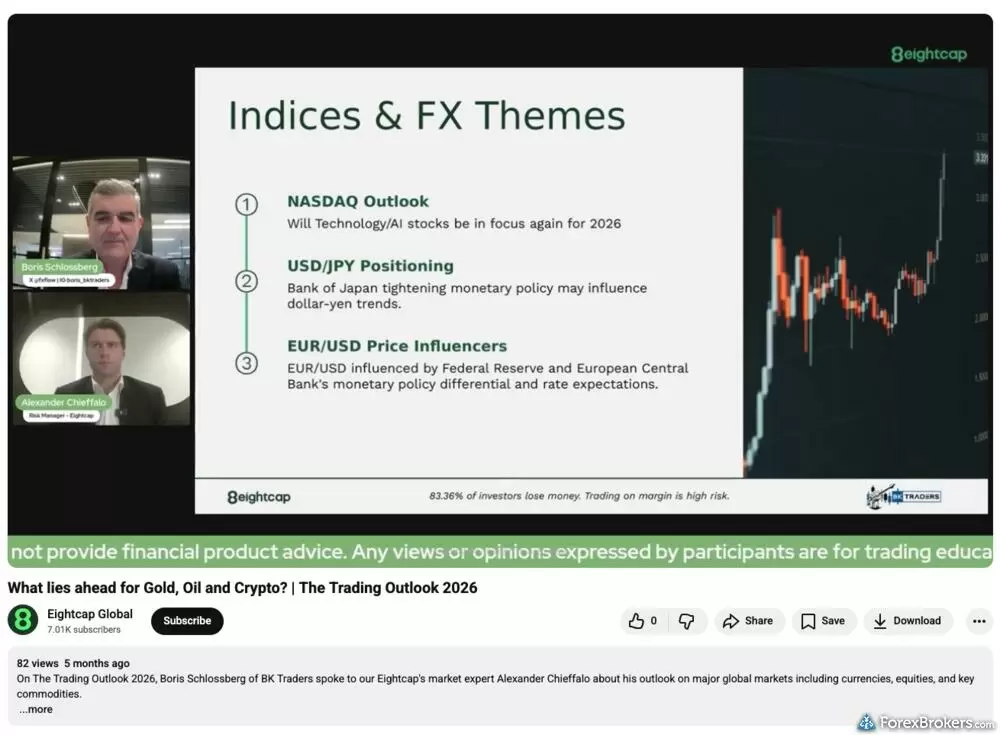
This archived video from the Eightcap Global YouTube channel is titled "What lies ahead for Gold, Oil and Crypto? | The Trading Outlook 2026." The presentation features speakers Boris Schlossberg and Alexander Chieffalo discussing "Indices & FX Themes." The displayed slide outlines outlooks for the NASDAQ, USD/JPY, and EUR/USD next to a candlestick chart. A green banner at the bottom of the video clarifies that the content is for educational purposes only.
Tutorials and written content: I could not find platform tutorials beyond the basic information on each platform's page, and there are no broker-specific walkthroughs. Written education barely extends past FAQs and asset pages. The tooltips and order-entry prompts inside TradingView, MetaTrader, and TradeLocker are helpful, and when an order parameter is wrong, both TradingView and MetaTrader flag it clearly and nudge you to correct it before you commit. That contextual feedback is the most useful learning Eightcap clients get, but it is native to those platforms, not something Eightcap created. One bright spot on the broker's side is a well-integrated article and set of widgets covering the Acuity dashboard, though that reads more as a feature explainer than a lesson.
Available educational offerings
We found a small set of beginner-oriented videos on Eightcap's YouTube channel, but no structured courses, no quizzes, no progress tracking, and no dedicated education hub on the website.
| Feature |
Eightcap
|
|---|---|
| Education (Forex) | No |
| Education (CFDs) | No |
| Education (Crypto) | No |
| Education (Stocks) | No |
| Education Area (Website) | No |
| Education Area (Mobile App) | No |
| Webinars | No |
| Videos - Beginner Trading Videos | Yes |
| Videos - Advanced Trading Videos | No |
Final thoughts
What I appreciate about Eightcap is that it does not just slap its name on MetaTrader and stop there. It layers on extras like the FlashTrader plug-in, an Acuity research dashboard, and a VPS for automated strategies, then adds TradingView and TradeLocker for traders who want even more than the standard MetaTrader experience. Pricing stays low throughout, and the crypto CFD lineup runs deep enough to earn best-in-class for crypto trading in our 2026 Annual Awards.
Where it runs out of road is depth beyond the platforms. The overall market range is middling, and its own research and education are too sparse to lean on. For hands-on forex and CFD traders who want low costs and plenty of platform options, Eightcap is a strong, cheap pick, provided you bring your own know-how. If you'd rather have a polished proprietary platform that guides you as you trade, I'd send you to find one among my picks for the best overall forex broker.
Eightcap's Star Ratings
| Feature |
Eightcap
|
|---|---|
| Overall Rating |
|
| Trust Score | 87 |
| Range of Investments |
|
| Trading Fees |
|
| Trading Platforms |
|
| Research |
|
| Mobile Trading |
|
| Education |
|
Our testing
Why you should trust us
Steven Hatzakis is a well-known finance writer, with 25+ years of experience in the foreign exchange and financial markets. He is the Global Director of Online Broker Research for Reink Media Group, leading research efforts for ForexBrokers.com since 2016. Steven is an expert writer and researcher who has published over 1,000 articles covering the foreign exchange markets and cryptocurrency industries. He has served as a registered commodity futures representative for domestic and internationally-regulated brokerages. Steven holds a Series III license in the US as a Commodity Trading Advisor (CTA).
All content on ForexBrokers.com is handwritten by a writer, fact-checked by a member of our research team, and edited and published by an editor. Our ratings, rankings, and opinions are entirely our own, and the result of our extensive research and decades of collective experience covering the forex industry.
Ultimately, our rigorous data validation process yields an error rate of less than .1% each year, providing site visitors with quality data they can trust. Click here to learn more about how we test.
How we tested
At ForexBrokers.com, our online broker reviews are based on our collected quantitative data as well as the observations and qualified opinions of our expert researchers. Each year we publish tens of thousands of words of research on the top forex brokers and monitor dozens of international regulator agencies (read more about how we calculate Trust Score here).
Mobile testing is conducted on modern devices that run the most up-to-date operating systems available:
- For Apple, we use MacBook Pro laptops running macOS 15.3, and the iPhone XS running iOS 18.3.
- For Android, we use the Samsung Galaxy S20 and Samsung Galaxy S23 Ultra devices running Android OS 15.
All websites and web-based platforms are tested using the latest version of the Google Chrome browser.
Our researchers thoroughly test a wide range of key features, such as the availability and quality of watch lists, mobile charting, real-time and streaming quotes, and educational resources – among other important variables. We also evaluate the overall design of the mobile experience, and look for a fluid user experience moving between mobile and desktop platforms.
Forex Risk Disclaimer
There is a very high degree of risk involved in trading securities. With respect to margin-based foreign exchange trading, off-exchange derivatives, and cryptocurrencies, there is considerable exposure to risk, including but not limited to, leverage, creditworthiness, limited regulatory protection and market volatility that may substantially affect the price, or liquidity of a currency or related instrument. It should not be assumed that the methods, techniques, or indicators presented in these products will be profitable, or that they will not result in losses. Read more on forex trading risks.
Read next
- Best Copy Trading Platforms for 2026
- Best Brokers for TradingView for 2026
- Best Forex Brokers for Beginners of 2026
- Best Forex Trading Apps for 2026
- Best Forex Brokers for 2026
- International Forex Brokers Search
- Compare Forex Brokers
- Best MetaTrader 4 (MT4) Brokers for 2026
- Best Low Spread Forex Brokers for 2026
More Forex Guides
- Best Forex Demo Accounts for 2026
- Best Forex Options Brokers for 2026
- Best MetaTrader 4 (MT4) Brokers for 2026
- Best Forex Brokers with APIs for 2026
- Best Crypto Brokers for 2026
- Best High-Leverage Forex Brokers for 2026
- Best PayPal Forex Brokers for 2026
- Best MetaTrader 5 (MT5) Forex Brokers for 2026
- Best Free Forex Trading Courses for 2026
- Best Forex Day Trading Platforms for 2026
- Best Forex Signal Providers for 2026
- Best Brokers for TradingView for 2026
- Best Market Maker Brokers in 2026
- Best CFD Trading Platforms for 2026
- Best High-Frequency Trading Software for 2026
- Best Algo Trading Software for 2026
- Best Brokers that Use TipRanks in 2026
- Best Trading Platforms for Mac Users of 2026
Popular Forex Broker Reviews
Plus500 is a trusted global brand that offers an easy-to-use trading platform for online traders, alongside access to share trading and selection of CFDs.
Steven Hatzakis May 04, 2026
Octa offers a basic, low-cost MetaTrader platform experience alongside its social copy-trading platform.
Steven Hatzakis May 04, 2026
Interactive Brokers is a highly trusted multi-asset broker with an extensive offering of tradeable global markets.
Steven Hatzakis May 04, 2026
eToro is a winner for its easy-to-use copy-trading platform, where traders can copy the trades of experienced investors – or receive exclusive perks for sharing.
Steven Hatzakis May 14, 2026
ACY Securities is a MetaTrader-only broker with a reasonable range of markets and a balanced account offering.
Steven Hatzakis May 04, 2026
AvaTrade is a trusted global brand best known for offering an extensive selection of trading platforms for forex and CFD traders.
Steven Hatzakis May 04, 2026
CMC Markets is well-trusted across the globe, and delivers a terrific trading experience thanks to its excellent pricing and nearly 12,000 tradeable instruments
Steven Hatzakis May 15, 2026
IC Markets’ competitive pricing and scalable execution make it an excellent option for algorithmic traders.
Steven Hatzakis May 04, 2026
Our 2026 HFM (HF Markets) review covers MT4, MT5, copy trading, the 344-symbol product offering, and 1.8-pip EUR/USD spreads, based on hands-on testing.
Steven Hatzakis May 29, 2026
FOREX.com is a trusted brand that delivers an excellent trading experience for forex and CFDs traders across the globe.
Steven Hatzakis May 04, 2026
FP Markets shines as a low-cost broker for trading forex and CFDs – as long as you use the MetaTrader platform.
Steven Hatzakis May 04, 2026
Our expert Tickmill review tests the broker's Raw account pricing, spreads, MetaTrader platforms, and tools to help you decide if it fits your trading in 2026.
Steven Hatzakis May 22, 2026
Check out our review of Charles Schwab, a highly trusted, multi-asset broker catering to U.S.-based and international forex traders.
Steven Hatzakis May 04, 2026
Best known for its mobile trading app, Trading 212 offers an easy-to-use trading platform suite for CFD and share trading.
Steven Hatzakis May 14, 2026
As a trusted multi-asset broker, XTB offers outstanding customer service, a wide variety of forex and CFDs, and an excellent overall trading experience.
Steven Hatzakis May 04, 2026
Pepperstone offers a growing range of tradeable markets, good-quality research, and support for multiple social copy trading platforms.
Steven Hatzakis May 14, 2026
Traders choose Swissquote for its quality research and vast multi-asset offering.
Steven Hatzakis May 04, 2026
FxPro competes among the top MetaTrader brokers, featuring multiple account options and various execution methods.
Steven Hatzakis May 15, 2026
Traders choose Admiral Markets (Admirals) for its excellent investor education and advanced MetaTrader features.
Steven Hatzakis May 04, 2026
Backed by StoneX Group, City Index is a trusted brand known for its versatile trading platforms, excellent mobile app, and diverse market research.
Steven Hatzakis May 15, 2026
Is Capital.com worth it in 2026? Our expert review covers 400+ crypto CFDs, a 0.64-pip EUR/USD spread, commission-free pricing, and platform quality.
Steven Hatzakis May 07, 2026
In my 2026 Exness review, I tested the Exness Terminal, MT4, and MT5 across 78 forex pairs. See my verdict on costs, research, and product range.
Steven Hatzakis May 27, 2026
For traders who appreciate advanced trading tools and quality market research, FXCM is a winner, especially for algorithmic trading.
Steven Hatzakis May 04, 2026
A trusted global brand, OANDA stands out for its reputation and quality market research.
Steven Hatzakis May 04, 2026
IG offers the ultimate comprehensive trading package, featuring excellent trading and research tools, and industry-leading education.
Steven Hatzakis May 21, 2026
Saxo is an exclusive multi-asset broker with brilliant research and a superb trading platform experience – and a selection of over 40,000 s securities.
Steven Hatzakis May 04, 2026About Eightcap
Eightcap was established in 2009 in Melbourne, Australia, and holds an Australian Financial Services License (AFSL) issued by the Australian Securities and Investments Commission (ASIC). Its U.K. entity, Eightcap Group Ltd, is authorised and regulated by the Financial Conduct Authority (FCA), while its EU clients are served under the Cyprus Securities and Exchange Commission (CySEC). In the Bahamas, Eightcap Global Pty Ltd is registered with the Securities Commission of the Bahamas (SCB).
About the Editorial Team
Steven Hatzakis is the Global Director of Online Broker Research for ForexBrokers.com. Steven previously served as an Editor for Finance Magnates, where he authored over 1,000 published articles about the online finance industry. A forex industry expert and an active fintech and crypto researcher, Steven advises blockchain companies at the board level and holds a Series III license in the U.S. as a Commodity Trading Advisor (CTA).
Jeff Anberg is a Senior Editor at ForexBrokers.com. Along with years of experience in media distribution at a global newsroom, Jeff has a versatile knowledge base encompassing the technology and financial markets. He is a long-time active investor and engages in research on emerging markets like cryptocurrency. Jeff holds a Bachelor’s Degree in English Literature with a minor in Philosophy from San Francisco State University.
Blain Reinkensmeyer has 20 years of trading experience with over 2,500 trades placed during that time. He heads research for all U.S.-based brokerages on StockBrokers.com and is respected by executives as the leading expert covering the online broker industry. Blain’s insights have been featured in the New York Times, Wall Street Journal, Forbes, and the Chicago Tribune, among other media outlets.