 IG
IG FOREX.com
 CMC Markets
 XTB
XTB eToro
eToro Capital.com
 AvaTrade
 XM
XM Pepperstone
 FP Markets
 Tickmill
 HFM Markets
XM Group Review

Written by Steven Hatzakis
Director of Online Broker Research

Edited by Jeff Anberg
Senior Editor

Fact-checked by Blain Reinkensmeyer
Managing Partner
Steven HatzakisDirector of Online Broker Research
Steven Hatzakis is the Global Director of Online Broker Research for ForexBrokers.com. He is a forex industry expert and an active fintech and crypto researcher.


CFDs are complex instruments and come with a high risk of losing money rapidly due to leverage. 75.33% of retail investor accounts lose money when trading CFDs with this provider. You should consider whether you understand how CFDs work and whether you can afford to take the high risk of losing your money.
I've reviewed XM Group for years, and it has rebuilt its front end since my last pass, so this time I started inside the new proprietary web platform and mobile app rather than in MetaTrader. I placed live trades from the TradingView-powered charts, dragged stop-loss and take-profit levels to price, saved a chart layout on mobile and reloaded it on the web, then logged into MT5 with the same credentials to compare pricing across account types.
XM is a good fit for forex and CFD trading on a modern in-house platform with research and live education built in. The Ultra Low account averages 1.1 pips on EUR/USD with no commission, and the 1,583 symbols, all CFDs, span stock CFDs, indices, metals, and energies. The trade-offs are a thin forex list, a Standard account priced well above the cheapest brokers I test, and an in-house platform still catching up on charting and order depth.
If live market education and a platform that keeps everything in one place matter more to you than the tightest spread or the longest symbol list, XM is a strong choice; if they don't, I'd start higher up our rankings.
-
Minimum Deposit:
$5 -
Trust Score:
93 -
Tradeable Symbols (Total):
1583
| Range of Investments | |
| Trading Fees | |
| Trading Platforms | |
| Research | |
| Mobile Trading | |
| Education |
Check out ForexBrokers.com's picks for the best forex brokers in 2026.
| 2026 | #16 |
| 2025 | #17 |
| 2024 | #18 |
| 2023 | #15 |
| 2022 | #18 |
| 2021 | #13 |
| 2020 | #21 |
| 2018 | #24 |
 Why you can trust us
Led by Steven Hatzakis, Global Director of Online Broker Research, the ForexBrokers.com research team collects and audits data across more than 100 variables. We analyze key tools and features important to forex and CFD traders and collect data on commissions, spreads, and fees across the industry to help you find the best broker for your needs.
We also review each broker’s regulatory status; this research helps us determine whether you should trust the broker to keep your money safe. As part of this effort, we track 100+ international regulatory agencies to power our proprietary Trust Score rating system.
Our researchers open personal brokerage accounts and test all available platforms on desktop, web, and mobile for each broker reviewed on ForexBrokers.com. Learn more about how we test.
Can I open an account with this broker?
Use our country selector tool to view available brokers in your country.
Table of Contents
XM Group pros and cons
PROS
- Live trading rooms run nearly around the clock across time zones and languages.
- Reuters headlines and Trading Central tools sit directly on the trade ticket.
- Proprietary web and mobile platform for forex and CFD trading, with TradingView charts and drag-to-modify.
CONS
- Standard account spreads average 2.0 pips on EUR/USD.
- Only 54 forex pairs, and the 1,583-symbol lineup is entirely CFDs.
- No crypto CFDs, copy trading, or Shares account from the EU entity.
My top takeaways for XM Group in 2026:
- The Ultra Low account averages 1.1 pips on EUR/USD (minimum 0.8) with no commission; the Standard account averages 2.0 pips.
- The Zero account charges $3.50 per side, or $7 per round-turn lot, for an all-in cost that starts at 0.7 pips when the raw spread is zero (on average, it will likely be marginally above zero).
- 1,583 tradeable symbols, all CFDs, including 54 forex pairs and 12 crypto CFDs (crypto is not offered from the EU entity or to U.K. retail clients).
- Beginner and advanced live trading rooms staffed by more than 70 analysts, plus a 48-lesson video course with progress tracking.
- A $5 minimum deposit, free international wires, and a $10 monthly inactivity fee after 90 days without activity.
Trust Score
Developed by ForexBrokers.com and in use for nearly 10 years, Trust Score is a proprietary rating system powered by a range of unique quantitative and qualitative metrics, including each company’s number of regulatory licenses. Trust Scores range from 1 to 99 (the higher a broker’s rating, the better). Learn more.
Is XM Group safe?

Trading Point Group, the parent company of XM, is considered Trusted, with an overall Trust Score of 93 out of 99. Trading Point Group is not publicly traded and does not operate a bank, but is authorised by four Tier-1 regulators (Highly Trusted), three Tier-2 regulators (Trusted), zero Tier-3 regulator (Average Risk), and three Tier-4 regulators (High Risk). XM Group is authorised by the following Tier-1 regulators: Securities & Exchange Commission (CySEC), and the following via the Trading.com brand: Australian Securities & Investment Commission (ASIC), Commodity Futures Trading Commission (CFTC), and Financial Conduct Authority (FCA).
Which entity opens your account decides what you can trade. The EU entity does not offer crypto CFDs, copy trading, or the Shares account, and leverage runs from 30:1 in the EU to as much as 1000:1 at XM Global, so check where the different XM entities are regulated before you fund.
| Feature |
 XM Group XM Group
|
|---|---|
| Year Founded | 2009 |
| Publicly Traded (Listed) | No |
| Bank | No |
| Tier-1 Licenses | 4 |
| Tier-2 Licenses | 3 |
| Tier-3 Licenses | 0 |
| Tier-4 Licenses | 1 |
Range of investments
Every symbol in XM's core lineup is a CFD. I counted 1,583 in the MT5 platform, and the same list carries over to the proprietary web app: stock CFDs, equity indices, thematic indices, ETFs, energies, metals, agricultural commodities, CFDs on a selection of futures contracts, and forex. That is a reasonable multi-asset menu for a broker of this type. Forex is where it runs thin. I checked the pair count across the Ultra Low and Zero accounts and across the in-house and MetaTrader platforms, and it holds at 54, which is not a significant selection next to category leaders such as CMC Markets and Saxo, both of which offer over one hundred. If you focus on the majors, XM will meet your needs; if you hunt exotics, it will not.
Cryptocurrency: XM does not offer crypto CFDs from its EU entity, but its other global entities carry 12 cryptocurrency CFDs, including Bitcoin and Ethereum. Crypto CFDs are not available to retail traders from any broker's U.K. entity, nor to U.K. residents (except Professional clients). There is no trading in the underlying coins, no crypto futures, and no 24/7 crypto trading.
Shares account: Beyond stock CFDs, XM offers a Shares account for cash equities with no leverage (100% margin). It requires a $10,000 deposit and is available only from the offshore entities, including XMTrading.com and XMGlobal.com, not from the EU entity. It is the one place in the lineup where you own the underlying stock rather than a contract on it.
What is absent: Options trading is not available, exchange-traded futures are not available, and there are no exotic products. Spread betting and prediction markets are also off the menu.
Leverage: It varies from 30:1 within the EU to as much as 1000:1 at the XM Global entity. I would treat the upper end as a number to avoid rather than a feature to use; the same position with more margin behind it is the more defensible way to run risk.
Available investment products
During our audit, we verified access to forex pairs and 1583 tradeable symbols in total, all of them CFDs spanning stocks, indices, ETFs, commodities, and a selection of futures contracts, with cash equities available separately through the offshore Shares account. We confirmed that options, exchange-traded futures, and spread betting are not offered.
| Feature |
XM Group
|
|---|---|
| Tradeable Symbols (Total) | 1583 |
| Forex Pairs (Total) | 54 |
| Forex trading (Spot) | No |
| Forex trading (CFDs) | Yes |
| Forex trading (Options) | No |
| Forex trading (Futures) | No |
| Forex trading (Crypto) | No |
| Commodities: Agriculturals | Yes |
| Commodities: Oil | Yes |
| Commodities: Gold | Yes |
| Commodities: Silver | Yes |
| U.S. Stocks (Shares) | Yes |
| U.S. Stocks (CFDs) | Yes |
| U.S. Stocks (Crypto) | No |
| Global Stocks (Non-U.S. Shares) | Yes |
| Global Stocks (Non-U.S. CFDs) | Yes |
| 24/5 Trading (U.S. Stocks - Shares) | No |
| 24/5 Trading (U.S. Stocks - CFDs) | No |
| 24/7 Trading (Crypto) | No |
| Prediction markets | No |
| Copy Trading | Yes |
| Bitcoin (BTC) | Yes |
| Ethereum (ETH) | Yes |
| Cryptocurrencies (Total) | 12 |
| Cryptocurrency (Underlying) | No |
| Cryptocurrency (CFDs) | Yes |
| Cryptocurrency (Futures) | No |
| Disclaimers | Note: Crypto CFDs are not available to retail traders from any broker's U.K. entity, nor to U.K. residents (except to Professional clients). |
Available funding options
Our tests confirm support for bank wire, credit and debit cards, Skrill, and Neteller, with a $5 minimum deposit and no charge for international wires. PayPal, Apple Pay, Google Pay, and crypto transfers are currently unavailable.
| Feature |
XM Group
|
|---|---|
| Debit card (Deposit/withdraw) | Yes |
| Credit card (Deposit/withdraw) | Yes |
| Bank Wire (Deposit/Withdraw) | Yes |
| Non-wire bank transfer (Deposit/Withdraw) | No |
| Apple Pay (Deposit/Withdraw) | No |
| Google Pay (Deposit/Withdraw) | No |
| Crypto (Deposit/withdraw) | No |
| Cryptocurrency (Wallet transfers) | No |
| PayPal (Deposit/Withdraw) | No |
| Skrill (Deposit/Withdraw) | Yes |
| Neteller (Deposit/Withdraw) | Yes |
XM Group fees
XM's pricing depends on the account you open. Choose well and it is competitive, but take the default and it is not. The Standard account is spread-only and averages 2.0 pips on EUR/USD from a floor of 1.6 pips, with gold starting at 4 points, which puts it well above the cheapest brokers I test. The Ultra Low account is also commission-free and is the one I would open. EUR/USD averages 1.1 pips from a 0.8 pip minimum, and gold starts at 2.4 points. Spreads are variable throughout, since XM does not offer fixed pricing, and the broker runs a market maker execution model rather than an agency one.
The commission-based route is the XM Zero account, which pairs lower prevailing spreads with a charge of $3.50 per side, or $7 per round-turn lot. When the raw spread sits at zero, that works out to an all-in cost of 0.7 pips, which is competitive, although average spreads will likely bring it marginally higher. Pricing follows the account, not the platform; I logged into the web app and MT5 with the same credentials and saw the same quotes in both. Which accounts you can open depends on your entity. The Standard and Ultra Low accounts are offered from XM Global, whereas the EU entity carries just the Ultra Low and the Zero account. The minimum deposit is $5.
Active trader accounts: There is no dedicated VIP tier and no active trader program. In practice the Ultra Low and Zero accounts fill that role. The difference is that the Ultra Low is spread-only and supports micro contracts, while the Zero account layers a commission on top of lower prevailing spreads and does not support micro contracts. Professional and Islamic swap-free accounts are also available, and in select regions a Shares account for cash equities runs at 100% margin with a $10,000 minimum.
Non-trading costs: International wire transfers are free on XM's side. An inactivity fee of $10 per month applies once an account has sat dormant for more than 90 days, and dormant means no trading, deposits, withdrawals, transfers, or additional account registrations in that window. If you run automated strategies on MetaTrader, the optional VPS plan costs $25 per month and is deducted automatically from your trading account.
Trading fees
In our live pricing analysis, we recorded an average EUR/USD spread of 2.0 pips on the Standard account and 1.1 pips on the Ultra Low account, alongside a $7.00 round-turn commission on the Zero account for an all-in cost that starts at 0.7 pips when the raw spread is zero. We confirmed that XM quotes variable spreads only.
| Feature |
XM Group
|
|---|---|
| Average spread (EUR/USD) - Spread-only account | 1.1 |
| Average spread (EUR/USD) - Raw spread account | Not provided |
| Commission per trade (EUR/USD) - Raw spread account | $7.00 |
| All-in Cost EUR/USD - Raw spread account | 0.7+ |
| Inactivity Fee | Yes |
| International Wire Fee | 0 |
| Minimum Deposit | $5 |
Account types
During our evaluation we verified three live account routes, the Standard, Ultra Low, and Zero accounts, with availability varying by entity, alongside a Shares account for cash equities in select regions. We also confirmed Islamic swap-free and professional accounts; there is no VIP tier or active trader program.
| Feature |
XM Group
|
|---|---|
| Variable Spreads | Yes |
| Fixed Spreads | No |
| Active Trader Program | No |
| VIP/Premium Account | No |
| Professional Account | Yes |
| Islamic Account | Yes |
Mobile trading apps
I spent considerable time in XM's new proprietary mobile app, and it is one of the better-organized apps I've tested this year. A bottom row carries Home, Markets, Trade, Portfolio, and More, with More holding research, news, education, and support. Tapping a resource in More renders it natively inside the app rather than bouncing you to an external URL, which is what I like most. My one grievance, and a small one, is that you cannot pin those modules into the layout, so you switch between the chart and the headlines. One-click trading takes two taps to enable.
Charting: Charts are powered by TradingView with nearly 100 indicators, including Keltner Channels, Donchian Channels, and Stochastic RSI, plus dozens of drawing tools, Gann fans and Elliott Wave patterns among them. There are only ten timeframes, from 1-minute to yearly, well short of the 20 or so TradingView supports elsewhere. Drag-to-modify for stop-loss and take-profit works, with one catch: when both were already active, I could not drag to modify them, only cancel and redraw. Layouts sync once saved by name. On a 1-minute gold chart I added a trendline, saved it as layout1, and loaded it instantly on the web.
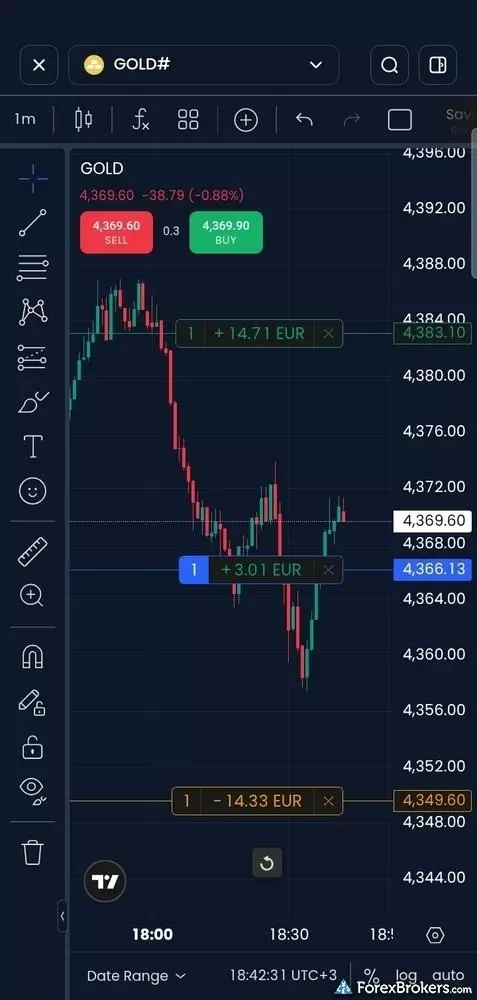
The XM mobile application includes an interactive candlestick chart powered by TradingView, shown here tracking spot gold (GOLD#). The interface allows traders to monitor real-time bid and ask prices alongside active position levels directly on the chart.
Order management: The ticket slides in when you press buy or sell on an asset's mini chart, and it is uncluttered. You can choose quantity or lots, market or pending via a "buy when price is" toggle, and stop-loss and take-profit as a price or dollar amount, with required margin shown in base currency and as a percentage. Trailing stops are not supported in the app, though they exist in MetaTrader. You can also close all profitable, all losing, or all open positions in one tap. Price alerts arrive as push notifications, in-app pop-ups, or in your inbox.
Discovery: Watchlists under the Markets tab combine default, custom, and asset-category lists with dynamic Popular, Top Gainers, and Top Losers lists, all syncing with the web. The Trading Central module adds a stock and forex screener plus Market Buzz, and the Home tab shows Top Long and Top Short sentiment on a green and red slider. Search is excellent. Tapping the bar lists every asset by category so you can browse without typing. Typing XAU returns the gold pairs almost instantly, while GOLD returns even more, including the 24/7 GOLD24-7 contract.
Gaps: There are no AI-powered tools, and performance reporting stops at balance and trade history. Copy trading is not available from the app or the EU entity, and the MetaTrader Signals market is disabled. Switching between live and demo accounts takes a tap from the Trade or Home tab.
Steven's take
"Drag-to-modify for your stop-loss and take-profit is nicely integrated, but when I had an active stop-loss and take-profit, I was not able to drag to modify them, only cancel and drag a new one from scratch. The market could change in the meantime and leave a position exposed."
Steven Hatzakis
Director of Online Broker Research
Available mobile platforms and tools
In our hands-on testing, we found nearly 100 TradingView-powered charting indicators alongside an economic calendar, news feed, market movers, and price alerts across the iOS and Android apps, plus branded MT4 and MT5 mobile apps. Multiple watchlists sync across devices, though trendlines and indicators persist only when saved as a named layout.
| Feature |
XM Group
|
|---|---|
| Proprietary Mobile Trading App | Yes |
| Android App | Yes |
| Apple iOS App | Yes |
| Mobile Price Alerts | Yes |
| Mobile Charting - Draw Trendlines | Yes |
| Mobile Charting - Trendlines Autosave | No |
| Mobile Charting - Indicators / Studies | 100 |
| Mobile Charting - Indicators Autosave | No |
| Mobile Watchlists - Column Filtering | Yes |
| Mobile Watchlists - Column Customization | Yes |
| Mobile Watchlists - Create & Manage | Yes |
| Mobile Watchlists - Syncing | Yes |
Trading platforms
XM offers three routes into the market: its new proprietary web platform, the matching mobile app, and the MetaTrader suite, MT4 and MT5. There is no proprietary desktop platform and no cTrader. TradingView is not offered as a standalone platform, though its charting library powers the web and mobile apps. I spent most of my time in the web platform. Some modules move you out of the trading tab, which I thought a sensible way to avoid clutter. Customization stops at theme, watchlist, one-click trading, and saved chart templates. One feature I really appreciated is that the same login works for the web platform and MT5, so nothing is split off into a separate client portal.
Charting: The TradingView charts carry nearly 100 indicators and over two dozen measuring tools, from Fibonacci retracements to Gann and Elliott Wave patterns. Drag-and-drop works as it should: I placed trades and added a stop-loss and take-profit afterwards just by clicking on the chart and dragging each to my desired level. Timeframes are the weak point. You get ten, from 1-minute to yearly, with only two intraday intervals (1-hour and 4-hour) and no sub-1-minute charts, far less than the best brokers offer. The yearly interval was also buggy on gold (click here for our best gold trading platforms), showing only a single candle. .
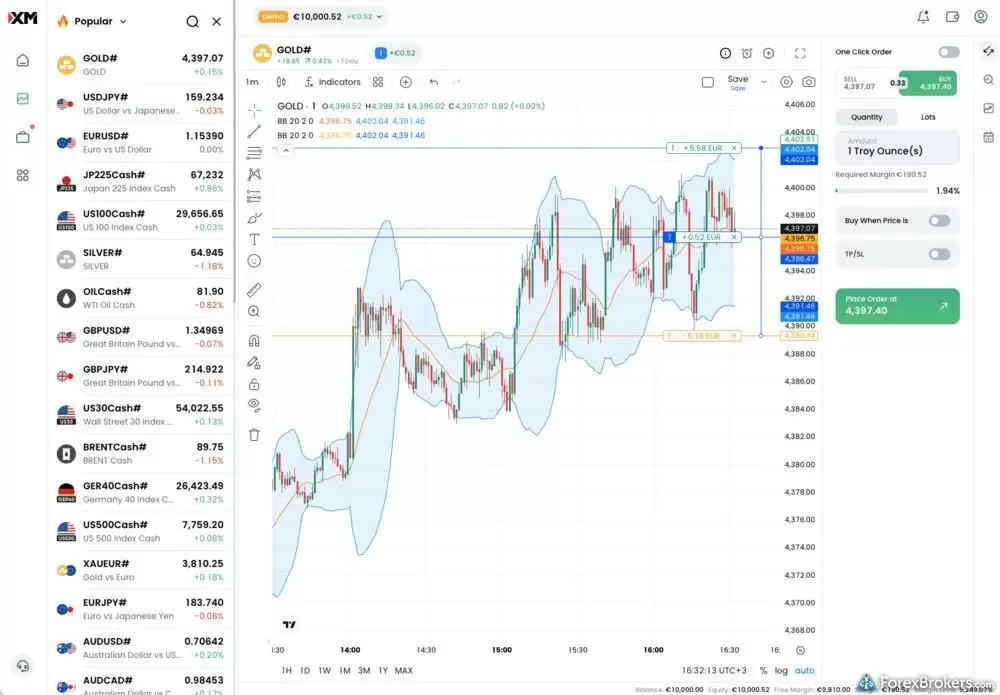
The XM proprietary web platform integrates technical charting with a comprehensive order management ticket. The central workspace features a TradingView candlestick chart for XAU/USD overlaid with Bollinger Bands and visual order lines.
Order management: The ticket sits beside the chart and toggles between market and pending orders. Stop-loss and take-profit can be set in base currency or price, order size in lots or quantity (0.01 lots of gold, or 1 troy ounce), and the ticket shows the margin percentage and cash required. There are no advanced order types, though you can close all profitable, close all losing, or flatten the account. I would like trailing stops and perhaps a GSLO added to the proprietary platform, although trailing stops do already exist in MetaTrader. There is no depth of market in the web platform, although MT5 desktop shows something similar when you expand the ticket, and no risk-reward ratio when adjusting a stop against a target.
Discovery: Watchlists include the default, custom lists, seven predefined lists by asset class, and two dynamic lists for top gainers and losers. Trading Central supplies the rest with Featured Ideas that surface roughly 10 trade setups a day, a Screener that pulls the top 100 results for a given scan, a forex tab for technical events, and Market Buzz as a volatility proxy. XM has built these into the platform itself, where many brokers bury them in the client portal.
Algorithmic trading and MetaTrader: MetaTrader is where XM's automation lives, and the integration is tidier than most. There is one set of credentials, a download branded with XM's logo, and backtesting in both MT4 and MT5. There is no API, so Expert Advisors on the desktop platform are the only path to automation, and latency-driven strategies are prohibited. A VPS plan runs $25 per month, deducted from your trading account, and position caps of 200 open orders on the Zero account and 300 on the Ultra Low micro account will matter to high-frequency strategies. MT5 carries the same 1,583 symbols as the web app, and there are no add-ons to the default build.
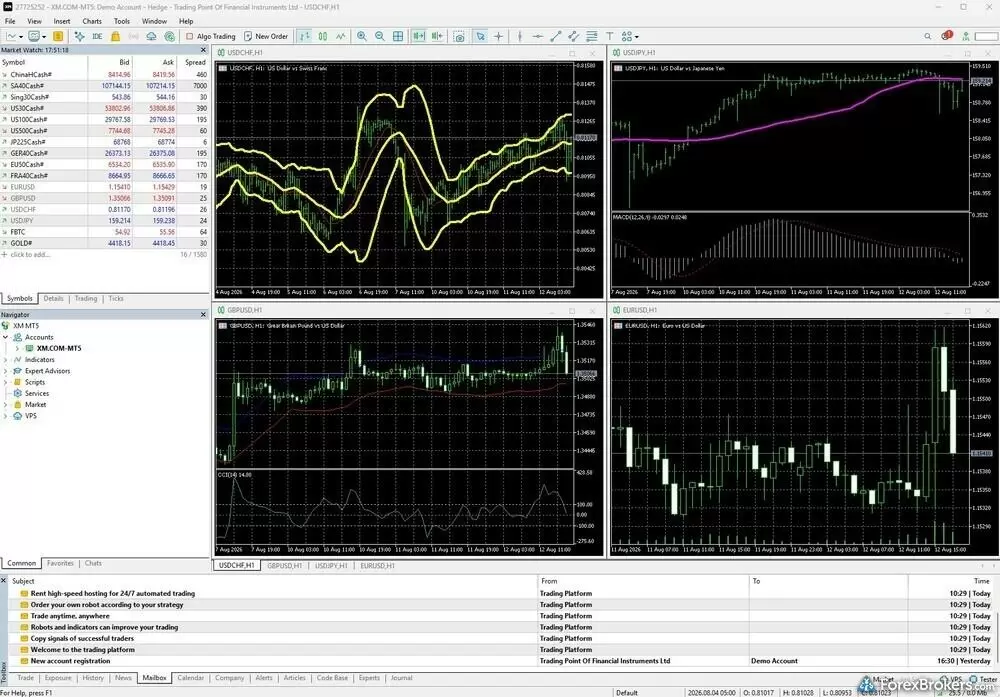
The XM MetaTrader 5 (MT5) desktop application provides a customizable workspace configured here with four simultaneous chart windows for USD/CHF, USD/JPY, GBP/USD, and EUR/USD.
Copy trading and other gaps: Copy trading is not supported at XM's EU entity, and the MetaTrader Signals market is disabled. The XMTrading.com and XMGlobal.com brands run a web-based copy trading app with over 18,000 strategies and 700,000 copy traders, with sort filters from Best Performers to Low Risk, though I was not able to sort for the worst performers. There is no trading journal or performance analytics beyond balance and trade history, but demo accounts sit alongside live ones and switching between them takes a click.
Available trading platforms and features
Our platform walkthrough verified charting indicators, trading directly from the chart, saveable chart layouts, price alerts, client sentiment data, and algorithmic trading through MetaTrader Expert Advisors with optional VPS hosting, though it excludes a proprietary desktop platform, cTrader, and API access.
| Feature |
XM Group
|
|---|---|
| Desktop Platform (Windows) | Yes |
| Desktop Platform (Mac) | No |
| MetaTrader 4 (MT4) | Yes |
| MetaTrader 5 (MT5) | Yes |
| FX Blue | No |
| Proprietary Desktop Trading Platform | No |
| Proprietary Web Trading Platform | Yes |
| TradingView | No |
| cTrader | No |
| Algorithmic trading | Yes |
| API Access | No |
| Charts can be saved | Yes |
| Client sentiment data | Yes |
| Trading Signals | Yes |
| Price Alerts | Yes |
| Virtual Private Server (VPS) | Yes |
| Virtual Trading (Demo) | Yes |
| Charting - Indicators / Studies (Total) | 100 |
| Charting - Trade From Chart | Yes |
| Charting - TradingView | Yes |
Available order types
We verified the availability of market, limit, and stop orders directly within the trade ticket, with trailing stops supported on the MetaTrader suite only. OCO, OTO, and guaranteed stop-loss orders are not supported.
| Feature |
XM Group
|
|---|---|
| Order Type - Market | Yes |
| Order Type - Limit | Yes |
| Order Type - Stop | Yes |
| Order Type - Trailing Stop | Yes |
| Order Type - OCO | No |
| Order Type - OTO | No |
| Order Type - GSLO | No |
Research
Research at XM is a strength, and the reason is integration rather than any single tool. Reuters headlines appear in a dedicated section of the web and mobile apps and, more usefully, on the trade ticket itself, where each headline carries icons for the assets it affects. On a USD/JPY chart, I scrolled to the News & Analysis tab and could pick out the headlines tagged with the USD/JPY icon, or the Japanese flag for the Nikkei. Under the Analysis tab, the daily market briefings struck me as both comprehensive and readable, with charts intertwined in the content.
Live streams, podcasts, and video: XM is among the best for its nearly round-the-clock webinars across time zones and languages, where analysts run beginner and advanced trading rooms. Recordings are archived as Trading Tips, Technical Analysis, and Weekly Outlook playlists on the XMGlobal YouTube channel. In one midweek technical outlook the presenter followed a prepared script and template, which keeps every video consistent. The Global Market Insights podcast has run since 2020 with over 1,500 episodes, a new one almost daily, though I found it more of a quick recap than an unscripted discussion. The XM on Air playlists add nearly 1,500 more recordings, from CNBC guest appearances to in-house programming.
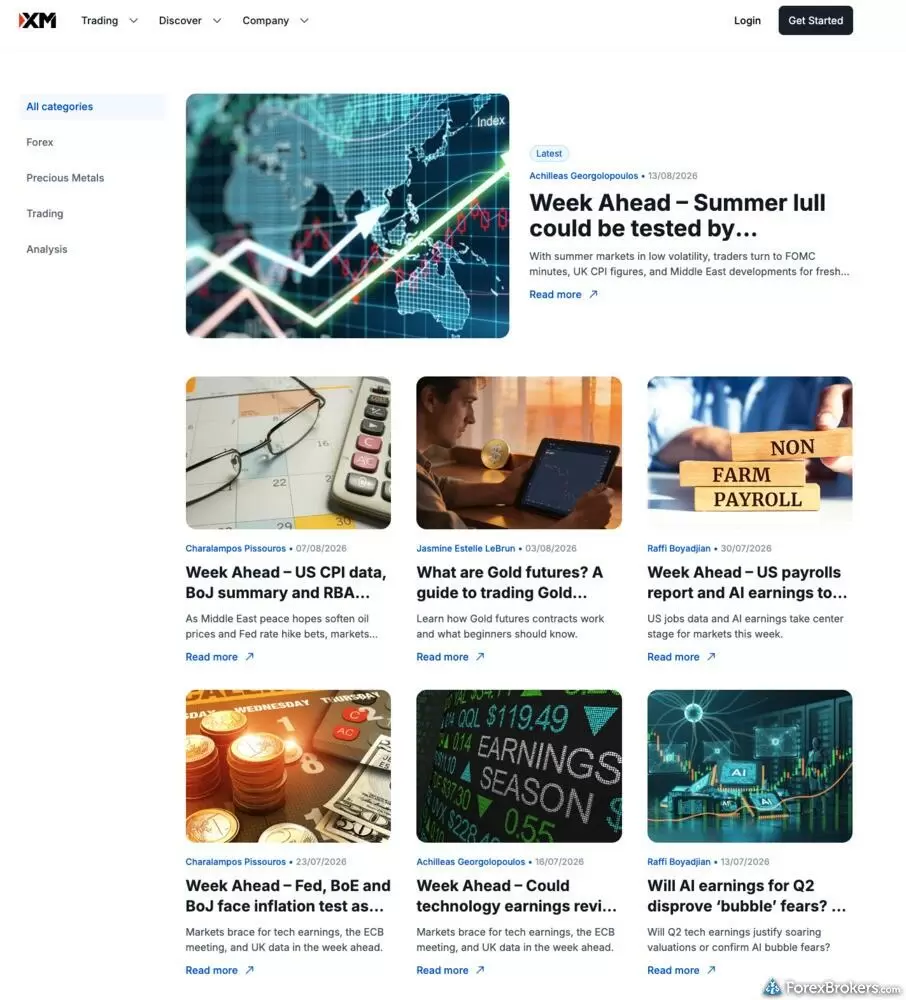
The XM website research section delivers structured market commentary and economic analysis categorized by asset class. The feed features regular articles authored by internal market analysts, covering upcoming macroeconomic events such as central bank rate decisions, inflation data releases, corporate earnings seasons, and employment reports across global equity, commodity, and currency markets.
Fundamental analysis: The economic calendar in both apps shows a history of past releases and a chart for each event when you click below the surface. A corporate events calendar sorts dividends, earnings, and corporate announcements into tabs with each stock's logo. Macro insight goes no deeper than the Week Ahead blog series on central bank policy and upcoming events, which is useful but no substitution for deep-dive PDF reports. Financial statement data is not available.
Sentiment and third-party tools: Client sentiment sits under the Insights tab in the trade ticket as a green and red bar of long versus short percentages, with Trading Central's Technical Score alongside it. Trading Central is the only third-party analysis provider, and XM has integrated it more completely than most. It provides Market Buzz, which charts how often a pair is mentioned on social media against its usual average, Strategy Builder, Fundamental Insights, Market Insights for chart-pattern recognition, and Featured Ideas, which act as trading signals but must be copied manually and include a suggested stop-loss, though not always a take-profit. Autochartist, Acuity Trading, and TipRanks are not offered.
Available research tools
Our analysis highlights daily market briefings, Reuters headlines tagged to the affected assets, webinars across every session, a near-daily podcast, and the Trading Central suite with client sentiment and an economic calendar, though the platform lacks Autochartist, Acuity Trading, and TipRanks.
| Feature |
XM Group
|
|---|---|
| Forex News (Top-Tier Sources) | Yes |
| Daily Market Commentary (Articles) | Yes |
| Daily Market Commentary (Videos) | Yes |
| Economic Calendar | Yes |
| Research - Earnings Calendar | Yes |
| Acuity Trading | No |
| Autochartist | No |
| TipRanks | No |
| Trading Central | Yes |
| Mobile Research - News | Yes |
| Mobile Research - Economic Calendar | Yes |
| Mobile Research - Market Movers | Yes |
Education
XM's education center is built for people who learn by watching, and for them it is one of the best in the category. The core is a set of live, almost continuous video streams where you join a webinar-style trading room split into beginner and advanced tracks, held at nearly all hours across time zones and languages by more than 70 analysts from XM's in-house team and third parties such as Tradepedia. When I was in the room, polls, quizzes, and live interaction ran alongside the instruction. There are no written courses with quizzes. Instead, the structured path is a Tradepedia video course with progress tracking, 48 lessons across 9 categories and a length of several hours.
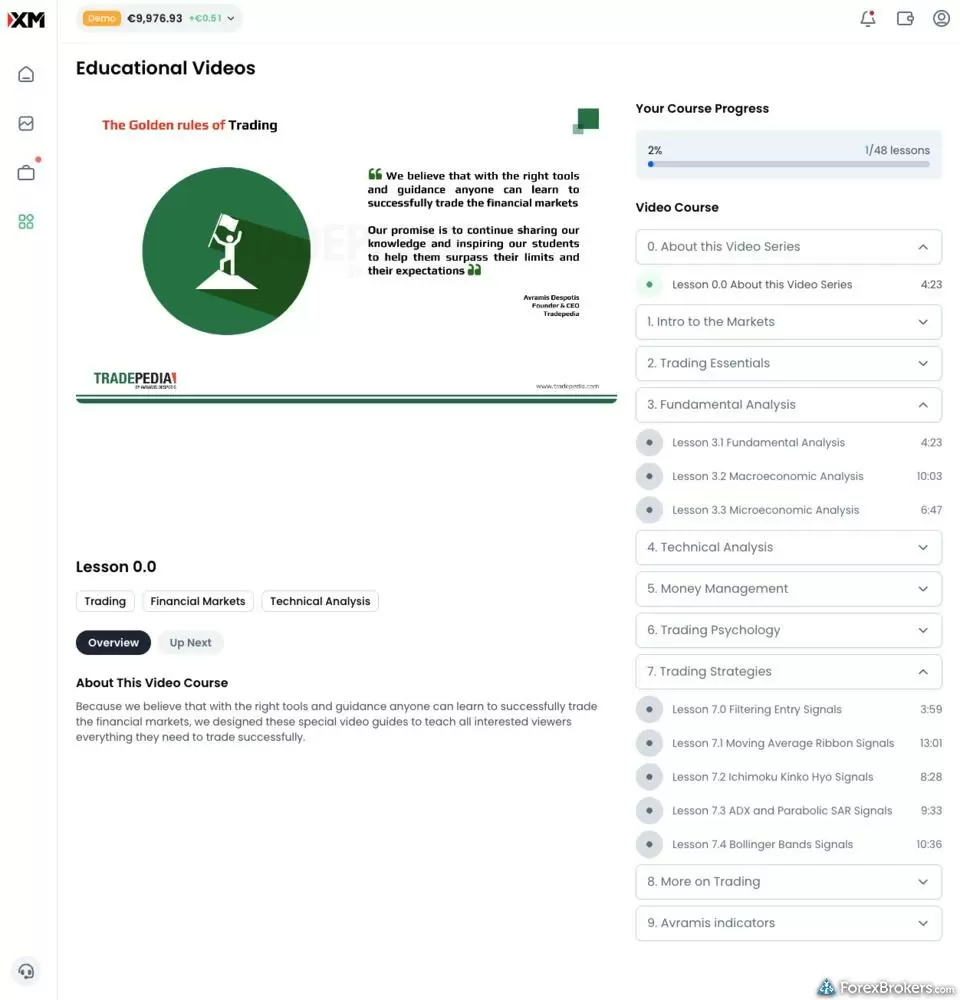
The XM educational portal features a structured video curriculum developed in partnership with Tradepedia. The dashboard tracks overall progress across 48 modular lessons, organizing content into progressive categories such as Fundamental Analysis, Technical Analysis, Money Management, and Trading Strategies. Each section includes specific lesson runtimes, topic overviews, and focused tutorials on technical indicators and market essentials.
Course quality: I found the lessons professional. Tradepedia's offering is run by Avramis Despotis, who has built courses, research, and even technical indicators, and the material is asset-agnostic, leaning on psychology, money management, technical analysis, and fundamental analysis while touching only conceptually on forex, shares, CFDs, and crypto. Progress tracking works. I logged out, came back the next day, and picked up exactly where I had left off. Quizzes are not part of the course, though XM uses them in its live rooms.
Written content: This is a bit shallow. Basics of Trading is a guide you click through as a series of 14 cards rather than a single page, and it reads well in chunks, but there are only 4 such guides plus nearly a dozen in the Quick Start section. More written material would help counterbalance the video-heavy offering.
Platform tutorials and contextual help: Tutorials in the web app cover managing a watchlist, placing a trade, managing positions, price alerts, and charting, in separate mobile and web versions, and the help center's Trading Walkthroughs answer questions like "Can I backtest my Expert Advisor (EA)?" in three succinct steps. On mobile, Quick Start under the More tab slides in a list of articles and tutorial links. The trade ticket nudges you when a value is wrong, with red text such as "Take profit must be greater than or equal to..." or "you don't have enough margin to place this order."
Available educational offerings
We found live beginner and advanced trading rooms across every session, a 48-lesson video course with progress tracking, platform tutorials for web and mobile, and an education area inside the mobile app. Written guides are limited, and the course itself carries no quizzes.
| Feature |
XM Group
|
|---|---|
| Education (Forex) | Yes |
| Education (CFDs) | Yes |
| Education (Crypto) | Yes |
| Education (Stocks) | Yes |
| Education Area (Website) | Yes |
| Education Area (Mobile App) | Yes |
| Webinars | Yes |
| Videos - Beginner Trading Videos | Yes |
| Videos - Advanced Trading Videos | Yes |
Final thoughts
XM makes it easy for forex and CFD traders to learn while they trade, and that is the broker's clearest edge. The live trading rooms run at nearly every hour, the Tradepedia video course tracks your progress, and the Reuters and Trading Central integration puts research on the trade ticket instead of in a separate portal. XM earned Best in Class for Education in our 2026 Annual Awards for good reason.
Unfortunately, a Standard account that averages 2.0 pips on EUR/USD, a forex list of just 54 pairs, and a proprietary platform that still lacks trailing stops, OCO orders, and more than ten chart timeframes keep it out of the top tier. If you want a well-built in-house platform backed by live education and integrated research, and you're happy on the Ultra Low or Zero account, XM is a strong choice. If your priority is the lowest spread, the widest market list, advanced order types, or copy trading from an EU account, I'd take a look at one of its highly rated competitors.
XM Group's Star Ratings
| Feature |
XM Group
|
|---|---|
| Overall Rating |
|
| Trust Score | 93 |
| Range of Investments |
|
| Trading Fees |
|
| Trading Platforms |
|
| Research |
|
| Mobile Trading |
|
| Education |
|
Our testing
Why you should trust us
Steven Hatzakis is a well-known finance writer, with 25+ years of experience in the foreign exchange and financial markets. He is the Global Director of Online Broker Research for Reink Media Group, leading research efforts for ForexBrokers.com since 2016. Steven is an expert writer and researcher who has published over 1,000 articles covering the foreign exchange markets and cryptocurrency industries. He has served as a registered commodity futures representative for domestic and internationally-regulated brokerages. Steven holds a Series III license in the US as a Commodity Trading Advisor (CTA).
All content on ForexBrokers.com is handwritten by a writer, fact-checked by a member of our research team, and edited and published by an editor. Our ratings, rankings, and opinions are entirely our own, and the result of our extensive research and decades of collective experience covering the forex industry.
Ultimately, our rigorous data validation process yields an error rate of less than .1% each year, providing site visitors with quality data they can trust. Click here to learn more about how we test.
How we tested
At ForexBrokers.com, our online broker reviews are based on our collected quantitative data as well as the observations and qualified opinions of our expert researchers. Each year we publish tens of thousands of words of research on the top forex brokers and monitor dozens of international regulator agencies (read more about how we calculate Trust Score here).
Mobile testing is conducted on modern devices that run the most up-to-date operating systems available:
- For Apple, we use MacBook Pro laptops running the latest, and the iPhone XS running the latest version of iOS.
- For Android, we use the Samsung Galaxy S20 and Samsung Galaxy S23 Ultra devices running the latest Android OS.
All websites and web-based platforms are tested using the latest version of the Google Chrome browser.
Our researchers thoroughly test a wide range of key features, such as the availability and quality of watch lists, mobile charting, real-time and streaming quotes, and educational resources – among other important variables. We also evaluate the overall design of the mobile experience, and look for a fluid user experience moving between mobile and desktop platforms.
Forex Risk Disclaimer
There is a very high degree of risk involved in trading securities. With respect to margin-based foreign exchange trading, off-exchange derivatives, and cryptocurrencies, there is considerable exposure to risk, including but not limited to, leverage, creditworthiness, limited regulatory protection and market volatility that may substantially affect the price, or liquidity of a currency or related instrument. It should not be assumed that the methods, techniques, or indicators presented in these products will be profitable, or that they will not result in losses. Read more on forex trading risks.
Read next
- Best Brokers for TradingView for 2026
- Best Low Spread Forex Brokers for 2026
- Compare Forex Brokers
- Best Forex Trading Apps for 2026
- International Forex Brokers Search
- Best Copy Trading Platforms for 2026
- Best Forex Brokers for Beginners of 2026
- Best MetaTrader 4 (MT4) Brokers for 2026
- Best Forex Brokers for 2026
More Forex Guides
- Best Crypto Brokers for 2026
- Best High-Leverage Forex Brokers for 2026
- Best MetaTrader 4 (MT4) Brokers for 2026
- Best CFD Trading Platforms for 2026
- Best Brokers that Use TipRanks in 2026
- Best Free Forex Trading Courses for 2026
- Best Brokers for TradingView for 2026
- Best Algo Trading Software for 2026
- Best Forex Demo Accounts for 2026
- Best MetaTrader 5 (MT5) Forex Brokers for 2026
- Best High-Frequency Trading Software for 2026
- Best PayPal Forex Brokers for 2026
- Best Forex Signal Providers for 2026
- Best Market Maker Brokers in 2026
- Best Forex Brokers with APIs for 2026
- Best Forex Options Brokers for 2026
- Best Trading Platforms for Mac Users of 2026
- Best Forex Day Trading Platforms for 2026
Popular Forex Broker Reviews
Check out our review of Charles Schwab, a highly trusted, multi-asset broker catering to U.S.-based and international forex traders.
Steven Hatzakis May 04, 2026
Traders choose Swissquote for its quality research and vast multi-asset offering.
Steven Hatzakis May 04, 2026
FOREX.com is a trusted brand that delivers an excellent trading experience for forex and CFDs traders across the globe.
Steven Hatzakis May 04, 2026
Saxo is an exclusive multi-asset broker with brilliant research and a superb trading platform experience, along with an extensive selection of over 71,000 securities.
Steven Hatzakis September 10, 2026
Our 2026 HFM (HF Markets) review covers MT4, MT5, copy trading, the 344-symbol product offering, and 1.8-pip EUR/USD spreads, based on hands-on testing.
Steven Hatzakis September 30, 2026
Interactive Brokers forex review: I tested IBKR's spreads, commissions, and platforms in 2026. More than 100 pairs, but a $2 minimum commission per order.
Steven Hatzakis September 28, 2026
Pepperstone offers a growing range of tradeable markets, good-quality research, and support for multiple social copy trading platforms.
Steven Hatzakis October 07, 2026
For traders who appreciate advanced trading tools and quality market research, FXCM is a winner, especially for algorithmic trading.
Steven Hatzakis October 09, 2026
As a trusted multi-asset broker, XTB offers outstanding customer service, a wide variety of forex and CFDs, and an excellent overall trading experience.
Steven Hatzakis October 07, 2026
Octa offers a basic, low-cost MetaTrader platform experience alongside its social copy-trading platform.
Steven Hatzakis May 04, 2026
A trusted global brand, OANDA stands out for its reputation and quality market research.
Steven Hatzakis May 04, 2026
CMC Markets review 2026: 303 forex pairs (the most we track), 21,000+ CFDs, and top-tier charting. See where its spreads and education fall short.
Steven Hatzakis October 09, 2026
IG offers the ultimate comprehensive trading package, featuring excellent trading and research tools, and industry-leading education.
Steven Hatzakis August 04, 2026
eToro is a winner for its easy-to-use copy-trading platform, where traders can copy the trades of experienced investors – or receive exclusive perks for sharing.
Steven Hatzakis August 04, 2026
AvaTrade is a trusted global brand best known for offering an extensive selection of trading platforms for forex and CFD traders.
Steven Hatzakis May 04, 2026
ACY Securities is a MetaTrader-only broker with a reasonable range of markets and a balanced account offering.
Steven Hatzakis May 04, 2026
FxPro competes among the top MetaTrader brokers, featuring multiple account options and various execution methods.
Steven Hatzakis October 07, 2026
Plus500 is a trusted global brand that offers an easy-to-use trading platform for online traders, alongside access to share trading and selection of CFDs.
Steven Hatzakis July 22, 2026
Eightcap review 2026: low-cost forex and CFD trading on TradingView, MetaTrader, and TradeLocker, with a deep crypto CFD lineup. Read our expert verdict.
Steven Hatzakis October 05, 2026
Our expert Tickmill review tests the broker's Raw account pricing, spreads, MetaTrader platforms, and tools to help you decide if it fits your trading in 2026.
Steven Hatzakis May 22, 2026
Traders choose Admiral Markets (Admirals) for its excellent investor education and advanced MetaTrader features.
Steven Hatzakis May 04, 2026
IC Markets is built for algorithmic and cost-sensitive forex traders: 0.72 pips all-in on EUR/USD and free colocated VPS, but no platform of its own.
Steven Hatzakis August 31, 2026
Best known for its mobile trading app, Trading 212 offers an easy-to-use trading platform suite for CFD and share trading.
Steven Hatzakis May 14, 2026
Formerly named City Index, StoneX Trading is a trusted brand known for its versatile trading platforms, excellent mobile app, and diverse market research.
Steven Hatzakis August 28, 2026
Is Capital.com worth it in 2026? Our expert review covers 450+ crypto CFDs, a 0.7-pip EUR/USD spread, commission-free pricing, and platform quality.
Steven Hatzakis October 15, 2026
In my 2026 Exness review, I tested the Exness Terminal, MT4, and MT5 across 78 forex pairs. See my verdict on costs, research, and product range.
Steven Hatzakis May 27, 2026
FP Markets shines as a low-cost broker for trading forex and CFDs – as long as you use the MetaTrader platform.
Steven Hatzakis October 08, 2026About XM Group
Founded in 2009, XM Group is the retail brand of Trading Point Group, a market maker broker offering forex and CFD trading through a proprietary web and mobile platform and the MetaTrader 4 and MetaTrader 5 suite. The group holds four Tier-1 licenses: the Cyprus Securities and Exchange Commission (CySEC) covers its EU entity, while the Australian Securities and Investments Commission (ASIC), the U.S. Commodity Futures Trading Commission (CFTC), and the U.K. Financial Conduct Authority (FCA) are held through the Trading.com brand. Three Tier-2 licenses and one Tier-4 license cover the group's other entities, including the XMGlobal.com and XMTrading.com brands, which are regulated outside the EU in jurisdictions including Mauritius and the Seychelles.
About the Editorial Team
Steven Hatzakis is the Global Director of Online Broker Research for ForexBrokers.com. Steven previously served as an Editor for Finance Magnates, where he authored over 1,000 published articles about the online finance industry. A forex industry expert and an active fintech and crypto researcher, Steven advises blockchain companies at the board level and holds a Series III license in the U.S. as a Commodity Trading Advisor (CTA).
Jeff Anberg is a Senior Editor at ForexBrokers.com. Along with years of experience in media distribution at a global newsroom, Jeff has a versatile knowledge base encompassing the technology and financial markets. He is a long-time active investor and engages in research on emerging markets like cryptocurrency. Jeff holds a Bachelor’s Degree in English Literature with a minor in Philosophy from San Francisco State University.
Blain Reinkensmeyer has 20 years of trading experience with over 2,500 trades placed during that time. He heads research for all U.S.-based brokerages on StockBrokers.com and is respected by executives as the leading expert covering the online broker industry. Blain’s insights have been featured in the New York Times, Wall Street Journal, Forbes, and the Chicago Tribune, among other media outlets.